
Get started with CapCad in minutes
Free for 30 days, full functionality. No sign-up.
System without administrator permission? Manual installation
Installing on many computers? How to use the command line
Bentley MicroStation is under evaluation. Let us know if you are interested.
Questions? Write to us at team@capcad.io or on WhatsApp.
Software requirements
One of the following CAD platforms (64-bit):
Excel (optional) for some functions. Ask us about other platforms.
How to install
Download and run the installer
Click one of the buttons above to download. Run the .exe file and authorise Windows Defender if it appears (choose "More info / Run anyway").
By installing and activating CapCad you accept our terms and conditions. For systems that cannot run .exe files, see manual installation.
Open the CapCad ribbon in your CAD
After installing, open your CAD and go to the CapCad tab on the ribbon:

Activate CapCad
Click any command, or "CapCad Account". Enter your e-mail. The activation code is sent automatically. Check every folder in your mailbox.
If you click a command before activating, CapCad shows this first:
No active CapCad license was found for this command.
If you do have one, please restart. If you are not signed in, open the license manager.
If it is something else, write to us at team@capcad.io
Click License manager to open the manager and activate.
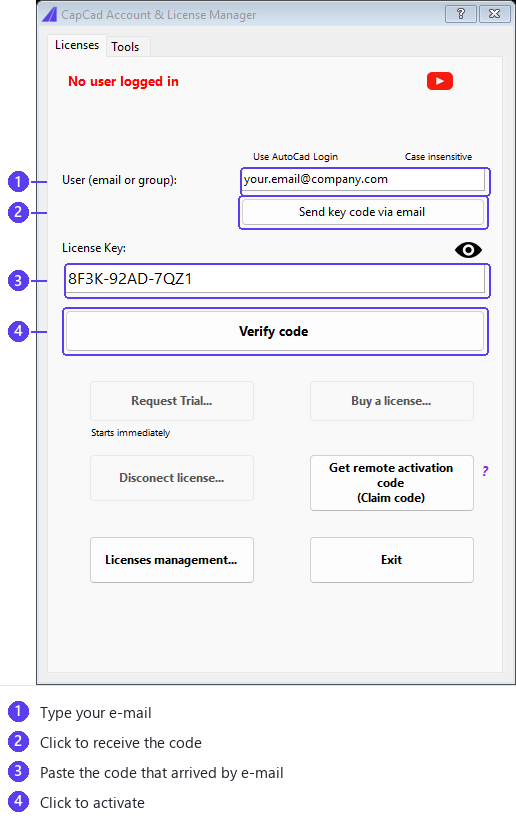
Request a trial
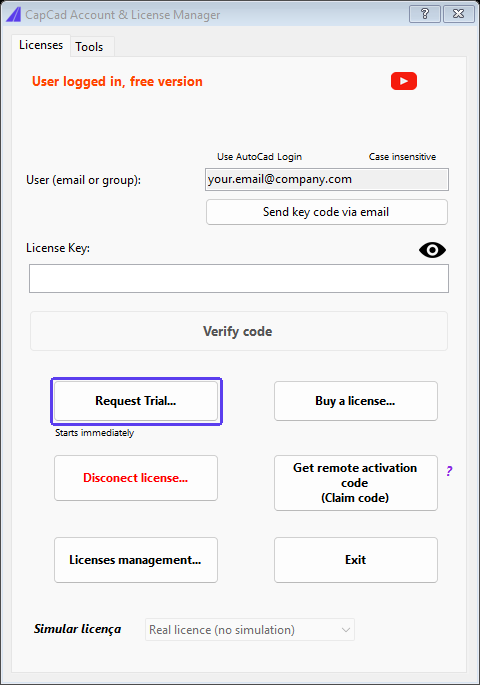
Start the trial period and enjoy CapCad's full functionality for 30 days!
During this period, our team is available for questions or for any new features you may find missing.
Click Request Trial... in the license manager.
Keep CapCad up to date
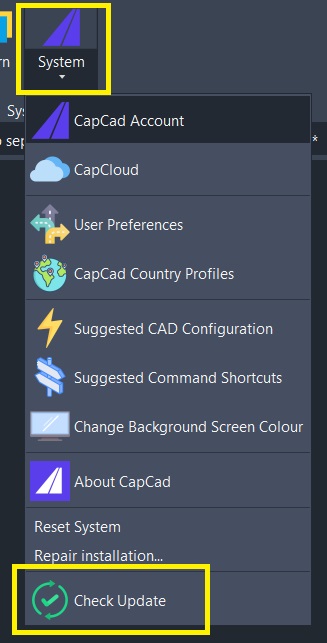
Make sure you are on the latest version from the update menu:
Frequently asked questions
Do I need to install the VBA Enabler?
No. CapCad does not require VBA in any version or on any CAD platform. If you used older versions of CapCad, that requirement no longer applies.
Does the decimal separator matter?
No. The operating system's decimal separator makes no difference (comma or full stop).
Does my CAD's language matter?
No. The language of your CAD software makes no difference (English, Spanish, Portuguese, etc).
Where can I install the program files?
The program files can go in any location, not necessarily C:\
Is it compatible with AutoCAD LT?
No. CapCad is not compatible with AutoCAD LT.
A general problem during installation?
Reset AutoCAD to its default settings, then download and install CapCad again.
What are the hardware requirements?
Your CAD platform's usual requirements apply, for example AutoCAD/Civil 3D's.
Didn't find what you were looking for? Write to us at team@capcad.io or on WhatsApp.
Ready to get started?
Visit our learning zone with video tutorials to master CapCad.
CapCad Learning Zone