| Commands | CAPCAD_LINETYPE_MANAGER (Linetype Manager) · CAPCAD_LINETYPE_IDENTIFY (identify an entity's linetype) |
| Shortcuts | none |
| Ribbon | CapCad tab › Horizontal panel › Faixas split button › Linetypes and Get Linetype Definition |
| Category | Horizontal |
| Form | LinetypeManagerForm — Linetype Manager (modal). CAPCAD_LINETYPE_IDENTIFY has no form: it asks for an entity and answers in a dialog box |
| Hosts | CAPCAD_LINETYPE_MANAGER: AutoCAD, BricsCAD, GstarCAD, ZWCAD and ARES Commander. CAPCAD_LINETYPE_IDENTIFY: AutoCAD only (on ARES it reports itself as coming soon) |
The dashed patterns of road marking come ready made, grouped by subject and with names you can read — and you load only the ones you are going to use. The CAD's own manager lists a whole file with no context; here the list arrives split into signing categories, and whatever is missing you create on the spot.
- A catalogue by subject. Cadenced lines, lines with studs, with delineators, with cones, side studs, arrows, survey elements, geology — each group in its own category.
- A name that reads.
2x4is a 2-unit mark and a 4-unit gap.1x1TAis the same cadence with studs. The linetype's name is the cadence. - The right file for your profile. The manager opens the
.linfile that matches the active country profile, and the Select source combo lists every.linin the Support folder. - Missing a pattern? Make one. Type
5x3and the pattern is written into a.linfile of your own, with no text editor and no CAD syntax. - Find out instead of guessing. One click on a marking and CapCad tells you the linetype name, the mark, the gap and the scale factor applied.
- When the linetype is continuous, the layer answers. If the entity has no dash pattern, CapCad reads the cadence out of the signing layer's own name.
What the .lin files are
A CAD linetype is a pattern of marks and gaps declared in a .lin text file. CapCad installs its own in the Support folder of the installation:
| File | What it is for |
|---|---|
TSRGD plus.lin |
The default source in every country profile but one: TSRGD patterns plus standard, ISO and services linetypes |
capcad.lin |
The road-marking catalogue of the remaining profile — the largest of the three, 278 entries |
UserCreatedLinetypes.lin |
Where Define new dashed… writes what you create. It only exists after the first one |
A third shipped file carries the patterns of one national road agency; every .lin in the Support folder shows up in the Select source combo whichever profile you are in.
CapCad adds a header of its own to these files: a line starting with ;= opens a category, and the *NAME,description declarations below it belong to it. It is this markup — invisible to the CAD, which reads it as a comment — that produces the manager's Category combo.
The categories of TSRGD plus.lin
| Category | Contents |
|---|---|
| TSRGD LINETYPES | The road-marking patterns, named by their cadence or by their diagram number |
| STANDARD LINETYPES | The CAD's usual dashed, centre and phantom patterns |
| ISO LINTYPES | The ISO patterns (the file's own spelling of the heading) |
| SERVICES LINETYPES | Utilities and buried services |
96 linetypes in all. A file with no ;= headers opens with no categories at all and the two lists stay empty.
Linetype Manager
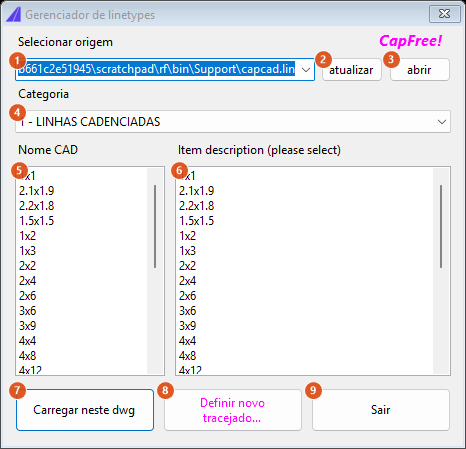
The screenshot is of a Portuguese session; the numbering is the same in both editions, and the table below gives the English captions.
| # | Control | What it does |
|---|---|---|
| 1 | Select source | The .lin file being read. The list carries every .lin in the Support folder; the field is editable, so it also accepts a typed path. Changing the text re-reads the file at once |
| 2 | refresh | Re-reads the chosen file — useful after editing it outside |
| 3 | open | Opens the file in Notepad, for inspection or hand editing. If the file does not exist the button does nothing |
| 4 | Category | The ;= categories of the file. Changing category rebuilds both lists below |
| 5 | Name CAD | The linetype names of the category, in file order. This list is read-only: it is not where you select |
| 6 | Item description (please select) | The description of each linetype — and the list where you do select, with Ctrl and Shift. When the file carries no description it repeats the name |
| 7 | Load in this dwg | Loads the linetypes selected in (6) into the drawing. A linetype already in the drawing counts as loaded; names the file does not have are listed at the end of the message |
| 8 | Define new dashed… | Asks for a cadence (5x3) and writes the pattern into UserCreatedLinetypes.lin, switching the source (1) to that file |
| 9 | Exit | Closes the window |
Loading a linetype
- Run
CAPCAD_LINETYPE_MANAGER. - Check the source (1).
- Choose the category (4).
- Select one or several items in the right-hand list (6).
- Click Load in this dwg (7). The command line reports how many were loaded.
Loading only registers the pattern in the drawing: it does not change the current linetype nor any layer's. To use the pattern, apply it afterwards to a layer or to an entity — or, better, let the layer catalogue do it, since a signing layer with a cadence in its name resolves its own linetype.
The two lists scroll separately. Name CAD (5) and the descriptions (6) are parallel line by line, but each has its own scrollbar: scrolling one does not scroll the other. In long categories, scroll both or check by name after loading.
Defining a new dashed pattern
Button (8) asks for a cadence in the form markxgap — 5x3, 2.5x1.5, 11.1x12. CapCad validates the text, builds the pattern A,mark,-gap and appends it to UserCreatedLinetypes.lin in the Support folder, creating the file and its category header the first time. If the pattern is already there it says so and does not duplicate it.
The name of the created linetype is the normalised cadence itself (5x3).
Only plain dashed patterns can be created here. A cadence carrying a device — 2x4TA, TA8, CTA4 — is refused, because the pattern would have to carry the stud symbol embedded, and that generation is not available in this version. A mark or a gap equal to zero (5x0, 0x5) is not a valid cadence either.
The file is written inside CapCad's installation folder. If that folder is write-protected, the system error appears in the message and nothing is created.
Identifying an entity's linetype
CAPCAD_LINETYPE_IDENTIFY asks for an entity and answers in a dialog box with the linetype Name, the mark × gap, the entity's scale factor and the pattern Definition.
What the command does, in order:
- It reads the entity's linetype. If it is ByLayer, it resolves through the layer's linetype.
- It looks that name up in the drawing's linetype table. Finding a pattern with marks, it reports:
- Name — the resolved linetype name;
- mark × gap — the first positive mark and the first negative gap of the pattern. When both are not there, it answers Continuous;
- Fator — the entity's own linetype scale (not the drawing's global one);
- Definition — the description declared in the
.lin; if the pattern has none, the list of lengths. - If the linetype has no mark at all — typically
Continuous— the command turns to the layer name: a CapCad cadence in the name (SINA_HOR_BR_2x4_LMS2) yields the mark × gap and the factor, even with no linetype loaded. - Finding neither, it answers No definition.
This is the command for checking an inherited marking: finding out whether that broken line is 2×4 or 4×6 without opening the properties and without counting dashes on screen.
Remembered between sessions
Nothing. The manager does not write your choices to the preferences: every run comes back to the profile's default file and the first category. What persists is the result — the linetypes loaded stay in the drawing, and the patterns you created stay in UserCreatedLinetypes.lin.
Notes
- A cadence in the layer name needs no loading. A signing layer with
2x4in its name has its linetype generated inside the drawing by the layer catalogue itself, without going through a.linfile. The manager is for the patterns that do not come from a cadence: arrows, survey elements, geology, services, barriers. - Devices do not become linetypes in this version. The categories with studs, delineators and cones exist in the
.linfiles and load normally, but they are not generated from a layer cadence: on that path the layer stays continuous and the device is drawn as a block. - The creation dialog is in English whatever the interface language: the title Define new dashed linetype, the request Enter the mark x gap pattern (e.g. 5x3): and the confirmations. The same goes for the load summary on the command line.
CAPCAD_LINETYPE_IDENTIFY's box mixes languages: the label Fator: comes out in Portuguese, while Name, mark x gap, Continuous, Definition and No definition come out in English. The command-line request is justentity....- Mark × gap is a simplified reading. For a pattern with several marks of different lengths, the command reports only the first mark and the first gap — the whole pattern is on the Definition line.
- The source is editable. Field (1) accepts any path, not only the
.linfiles of the Support folder.
See also
- Layer tools — listing and creating the catalogue's layers, with their linetype already resolved.
- CapStyle Editor — the style also points at the project's linetype file.