This page covers the two British (TSRGD) longitudinal markings CapCad draws along a path.
| Commands | CAPCAD_MARKING_ZIGZAG (zigzag) and CAPCAD_MARKING_TRANSVERSE_BAR (yellow transverse bars) |
| Shortcut | none, on either |
| Ribbon | CAPCAD_MARKING_ZIGZAG: CapCad tab › Traffic Control panel › Pedestrian Cross split button (and also under Transverse) › ZigZag Set. CAPCAD_MARKING_TRANSVERSE_BAR has no ribbon button: only the command line reaches it |
| Category | NEW, on both |
| Forms | ZigzagForm "ZigZag" · YellowTransverseBarsForm "Yellow Transverse Bars TSRGD". Both are modeless: the drawing stays live while they are open |
| Hosts | AutoCAD, BricsCAD, GstarCAD, ZWCAD, ARES Commander |
| Also opened by | none |
Two markings nobody wants to draw by hand twice. The zigzag has a fixed amplitude, pitch and gap between strokes; the bar set has 89 tabulated positions with a shortening spacing. In both cases CapCad puts everything in place from one path and one point.
- A live preview on both. Every value you change erases the previous drawing and redraws it.
- Three ways to take the path on the zigzag: path and point, point and direction, or the whole path.
- The path is fitted to the set. The length needed is
line length × sets × 2.5, and the path is stretched or shortened to that figure before drawing. - Terminal blips included, at the start, at the end or at both, with a width of their own.
- The TSRGD tables are already inside. Main carriageway (89 positions, up to 403.95 m) and slip road (44 positions, up to 199.3 m).
- A red cross at the start, so you can see where the set is running from before you accept it.
What it does
ZigZag
Draws the British no-stopping marking beside a crossing: a continuous zigzag along the kerb line, with a transverse "blip" at each end. The TSRGD dimensions are fixed: 0.50 m oscillation amplitude, 0.15 m between consecutive strokes, 0.05 m taken off each end of a stroke, and the terminal blip 0.55 m long with a 0.05 m clearance from the line.
You control the stroke length, the number of sets, the offset from the path, the widths, and which side the marking falls on.
The command fits the path to the length the requested set needs — line length × sets × 2.5 — stretching or shortening it. This is why Number of sets changes the size of the drawing and not only the count.
Yellow transverse bars
Draws the set of bars that warns a driver of a hazard ahead: bars transverse to the alignment, with a shortening spacing, so the sequence reads as acceleration.
The positions are the TSRGD ones, transcribed as distances accumulated from the clicked point: 89 positions for the main carriageway (2.75 · 5.5 · 8.25 … 403.95) and 44 for a slip road (2.75 · 5.55 · 8.45 … 199.3). Bars whose position would fall past the end of the path are simply not drawn — a short alignment gets fewer bars.
Each bar is a closed, filled rectangle with the length and width you set.
Workflow
ZigZag
- Run
CAPCAD_MARKING_ZIGZAG. - Choose the selection method (1, 4 or 6).
- Click Select (3) and make the pick the method asks for.
- Adjust the parameters on the right, pressing Enter in each box.
- If the drawing landed on the wrong side, tick Invert side (7); if it started from the wrong end, Change beginning (13).
- Clicking Select again (the caption becomes "Accept and select new") keeps what is already drawn and starts another set.
Yellow transverse bars
- Run
CAPCAD_MARKING_TRANSVERSE_BARon the command line. - Choose the road class (22 or 23) and the bar dimensions (24, 25).
- Click Select Entity & Point (21) and pick the path and the starting point. The point is marked in the drawing.
- Changing any value redraws the whole set.
- Reset (30) erases the set and lets go of the selection.
The form
The numbers on this page are unique and continuous: 1 to 20 on the ZigZag form and 21 to 30 on Yellow Transverse Bars TSRGD.
The screenshots below were captured in a Portuguese session; the control numbering is the same in every language, and the tables quote the English captions the forms show in an English session.
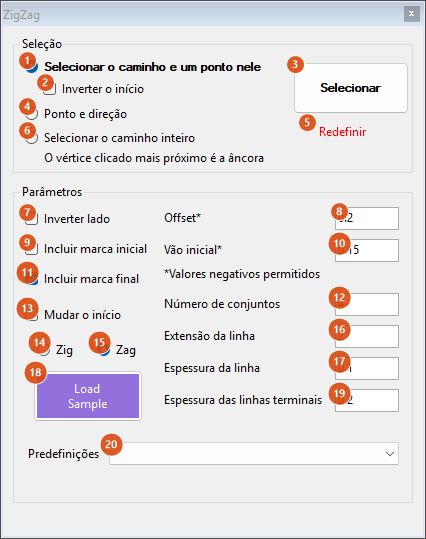
The zigzag form. The label under 6 reminds you that in "entire path" mode the nearest clicked vertex is the anchor.
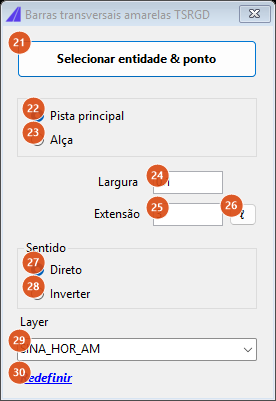
The transverse bars form.
ZigZag — selection
| # | Control | What it does |
|---|---|---|
| 1 | Select path and point on it | Asks for a curve and then a point on it; the path used is the stretch from the point to the end of the curve. This is the default. |
| 2 | Invert beginning | Only in this method (disabled in the others): uses the stretch from the point to the start of the curve. |
| 3 | Select | Makes the pick of the chosen method and draws. After the first time the caption becomes "Accept and select new": the previous set stays in the drawing and a new one begins. |
| 4 | Point and direction | Two clicks, the second rubber-banded from the first: the path is the straight line between them. |
| 5 | Reset | Erases the zigzag and the cross, and lets go of the path. |
| 6 | Select entire path | Asks for a curve and uses all of it. The clicked point decides the direction: if it falls past the middle, the curve is reversed, so the vertex nearest the click is the anchor. |
ZigZag — parameters
| # | Control | What it does |
|---|---|---|
| 7 | Invert side | Mirrors the marking to the other side of the path. |
| 8 | Offset | Lateral distance from the path to the nearest edge of the zigzag. Negatives accepted. |
| 9 | Include initial blip | Draws the transverse blip at the start. |
| 10 | Initial gap | The gap before the initial blip. Negatives accepted. The form always subtracts 0.1 from the value you type, to centre the set. |
| 11 | Include final blip | Draws the transverse blip at the end. Ticked by default. |
| 12 | Number of sets | How many zigzag sets. It also sets the length of the path: the path is fitted to line length × sets × 2.5. |
| 13 | Change beginning | Walks the path the other way and swaps the side. |
| 14 | Zig | The first stroke sets off to one side. |
| 15 | Zag | To the other. This is the default. |
| 16 | Line length | The length of each stroke along the path. |
| 17 | Line width | The width of the zigzag strokes. |
| 18 | Load Sample | Asks whether it may download, fetches the sample drawing sample-uk.dwg from the CapCad server and opens it. |
| 19 | Terminal lines width | The width of the two transverse blips. |
| 20 | Presets | UK-TSGRD and CHILE. Both load the same values: line length 2, width 0.1, 4 sets, offset 0.2 and terminals 0.2. |
Everything is drawn on the layer SINA_HOR_BRANCA, and a red cross marks the start of the path while the form is open.
Yellow transverse bars
| # | Control | What it does |
|---|---|---|
| 21 | Select Entity & Point | Hides the form, asks for the path and then the starting point, and marks the point in the drawing. |
| 22 | Main carriageway | Uses the 89-position table. This is the default. |
| 23 | Slip road | Uses the 44-position table, more widely spaced. |
| 24 | Width | The bar width, along the direction of travel. Default 0.1. A non-numeric or non-positive value falls back to the default. |
| 25 | Length | The bar length, transverse to the direction of travel. Default 3. |
| 26 | ℓ | Asks for a value and writes it into 25. |
| 27 | Direct | Walks the path in its own direction. This is the default. |
| 28 | Reverse | Walks it the other way. |
| 29 | Layer | SINA_HOR_BR or SINA_HOR_AM, with the yellow one selected. |
| 30 | Reset | Erases the set and lets go of the path and the point. |
Each bar is drawn filled and carries the group stamp YellowTransvBars, so CAPCAD_SELECT_GROUP re-selects the whole set.
How the options combine
The figures below came out of the engines themselves, on a straight path.
ZigZag

Preset UK-TSGRD with Zag, 4 sets: the path (dashed) was fitted to 2 × 4 × 2.5 = 20 m, and the two terminal blips close the ends.

The same with Zig: the first stroke sets off to the other side.

The same Zag with Invert side: the marking mirrors to the other side of the path.

Zag with 6 sets: the path becomes 2 × 6 × 2.5 = 30 m and the zigzag grows with it.
Transverse bars

Main carriageway, 3.00 × 0.10 bars from station zero of a 420 m alignment: 89 bars, the first at 2.75 m and the last at 403.95 m. The spacing grows from left to right — that is, it shortens towards the hazard.

Slip road: 44 bars, ending at 199.3 m.
Remembered between sessions
ZigZag: initial gap, line length, offset, line width, number of sets, terminal lines width and the selection method. The initial/final blip boxes, the side and Zig/Zag are not saved.
Transverse bars: nothing. The form always reopens on main carriageway, direct, width 0.1, length 3 and layer SINA_HOR_AM.
Notes
- Closing the ZigZag form does not erase the drawing — only the red start cross. Reset erases the zigzag.
- Clicking Select again on the ZigZag does not erase the previous set: it becomes a final result and a new set begins.
- Number of sets does not limit how many strokes are drawn: it sets the length of the path, and the marking fills whatever length there is.
CAPCAD_MARKING_TRANSVERSE_BARhas no ribbon button. The English panels do carry a "Yellow Transv' Bars" button, but it runsCAPCAD_MARKING_SPEED_REDUCTION_LINES(see Speed-reduction lines, rumble strips and humps), not this command.