| Command | CAPCAD_MARKING_AREA_LINEAR |
| Shortcut | ZL |
| Ribbon | CapCad tab › Traffic Control panel › Area Marking split button › By Path (tooltip Hatched Area by Path) |
| Category | Horizontal: specials |
| Form | LinearForm (modeless: the drawing stays live while it is open) |
| Hosts | AutoCAD, ARES Commander |
| Also opened by | CAPCAD_MARKING_AREA_ASSISTANT (one entity selected, answer Linear); the Airport tools (taxiway marking) |
A chevron band of constant width, drawn from the centreline alone. The CAD gives you OFFSET and ARRAY; the chevrons still have to be drawn, mirrored and trimmed one by one. This tool draws the whole band from one line.
- One line, two edges. Pick the centreline (or two points) and give the width: the two edges are offset for you and the Vs are stationed along the axis.
- Four patterns. Merge, diverge, off side and near side, chosen from pictures.
- Live preview. Spacing, widths, angle, gap and start redraw the band immediately.
- Norm presets. UK TSRGD, US FHWA, the white and yellow sets of the active country profile and the coloured boxes (blue, green, red, black) set values and layers together.
- Studs and delineators. Stud blocks at the strip feet or delineators along the axis, with the visibility you choose.
- Layers under control. Internal and external layers are chosen on the form and receive the action suffix (implant, keep, remove, refurbish).
What it does
The Linear Chevron tool draws a linear zebrado: a band of V-shaped strips (chevrons) of constant width running along a centreline you pick. The two edges of the band are the centreline offset by half the Start width to each side; the Vs are stationed along the centreline every (Inner distance + Inner width) × √2 and drawn with the Inner width; the edges are drawn with the Channelisation width. Four patterns change the way the V opens: Merge, Diverge (white, same-direction traffic) and Off side, Near side (yellow, opposing traffic).
Everything is a live preview: every change on the form erases the previous result and redraws it. Accept keeps the result and frees the form for the next path.
Workflow
- Run
CAPCAD_MARKING_AREA_LINEAR(or typeZL). The form opens beside the drawing. - Choose Path (2) or 2 points (3) and click Select path… (1). The band appears at once with the default width of 2 m.
- Set Start width and End width (10, 11; they must be equal), pick a pattern (4 to 7) and the Inner angle (8).
- Set Inner distance (21), Inner width (23), Channelisation (25), Gap between lines (27) and Start at (28), or load a Preset (18).
- Choose the layers (24, 26) and the Action (29).
- Pick the studs (30 to 34).
- Click Accept (19) to keep the result or Reset (20) to erase it.
The form
Numbers are the same in every screenshot of this page.
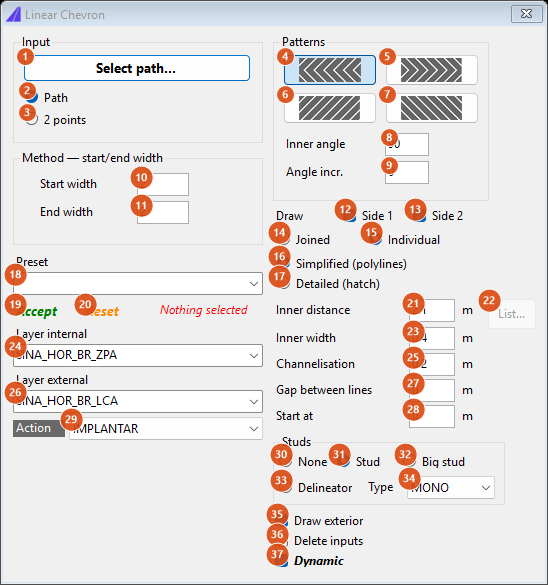
Default state: Path, Merge, widths 2 / 2, Individual, Simplified, Stud MONO, Draw exterior, Dynamic.
Input and method (left)
| # | Control | What it does |
|---|---|---|
| 1 | Select path… | Hides the form and picks the centreline (prompt Select CENTERLINE) or, in 2 points mode, two points (Ponto 1, bordo ESQUERDO, Ponto 2, bordo DIREITO) joined by a straight line. A closed curve is refused (Caminho não pode ser fechado.), and so is a path longer than 2000 units. |
| 2 | Path | The picked entity (line, polyline or arc) is the centreline. |
| 3 | 2 points | The centreline is the straight line between the two points you click. |
| 10 | Start width (m) | Width of the band: the two edges are the centreline offset by half this value to each side. |
| 11 | End width (m) | Must be equal to Start width; a different value stops the preview with Largura inicial ≠ final ainda não suportado (offset variável). (tapered bands are not available in this version). |
| 18 | Preset | Loads a set of values and redraws; see the table below. Entries that are not available in this version show a dialog and change nothing. |
| 19 | Accept (green) | Keeps the preview as ordinary entities and forgets the path. Status: Aceito. Selecione novo caminho. |
| 20 | Reset (orange) | Erases the preview. |
| status line | Nothing selected in red until a path is picked; Selection ok in blue; then the strip count after every redraw. | |
| 24 | Layer internal | Layer of the chevrons and the studs: SINA_HOR_BR_ZPA or SINA_HOR_AM_ZPA, or any name you type. |
| 26 | Layer external | Layer of the two edges: SINA_HOR_BR_LCA or SINA_HOR_AM_LCA, or any name you type. |
| 29 | Action | IMPLANTAR draws on the layers as typed; MANTER, REMOVER and REVITALIZAR add the _MAN, _REM or _REV suffix to both. |
Patterns (top right)
| # | Control | What it does |
|---|---|---|
| 4 | Merge | White pattern: the V closes against the direction of the axis (default). |
| 5 | Diverge | White pattern: the V opens the other way. |
| 6 | Off side | Yellow pattern. In Simplified mode it draws nothing with the default angle (both rays fall on the same edge); use Detailed (hatch) with it. |
| 7 | Near side | Yellow pattern: the V points along the axis. |
| 8 | Inner angle | Opening of the V in degrees: each ray leaves the axis at half this angle (90 gives rays at 45°). |
| 9 | Angle incr. | Not available in this version. |
| 12 | Side 1 | Detailed mode only: draw the strips of the first edge. |
| 13 | Side 2 | Detailed mode only: draw the strips of the second edge. In Simplified mode both sides are always drawn as one V. |
| 14 | Joined | Greys out Side 1 and Side 2; it does not change the drawing. |
| 15 | Individual | Enables Side 1 and Side 2 (default). |
| 16 | Simplified (polylines) | Each V is one polyline with the Inner width; the edges are polylines with the Channelisation width (default). |
| 17 | Detailed (hatch) | Each half V is a closed outline filled with a solid hatch when drawn; the edges become closed filled bands. Selected automatically by a preset with a gap. |
Parameters (right)
| # | Control | What it does |
|---|---|---|
| 21 | Inner distance (m) | Clear spacing between chevrons. Along the axis the Vs are (Inner distance + Inner width) × √2 apart: the defaults give 3.54. |
| 22 | List… | Not available in this version. |
| 23 | Inner width (m) | Width of the chevron strips. |
| 25 | Channelisation (m) | Width of the two edges. |
| 27 | Gap between lines (m) | Clearance kept between the ends of the strips and the edges. |
| 28 | Start at (m) | Distance along the axis before the first V. With 0 the first V sits at the start of the path. |
Studs
| # | Control | What it does |
|---|---|---|
| 30 | None | No blocks. |
| 31 | Stud | Inserts the TACHA block on each edge, between the strip feet (the first and last pieces are skipped), on the internal layer (default). |
| 32 | Big stud | Same with the TACHAO block. |
| 33 | Delineator | Inserts the BALIZA block along the axis, one between every two Vs, on the internal layer. No studs on the edges. |
| 34 | Type | Visibility state of the stud block: MONO, BI, MONO_PLOTAVEL, BI_PLOTAVEL, GENERICA_VAZADO, GENERICA_PREENCHIDO. SEM draws no studs. |
Options (bottom right)
| # | Control | What it does |
|---|---|---|
| 35 | Draw exterior | Simplified mode: also draw the two edges as channelisation lines on the external layer (default). In Detailed mode the edge bands are always drawn. |
| 36 | Delete inputs | Erases the picked centreline from the drawing after the pick (Path mode only). |
| 37 | Dynamic | Live preview on. When it is off nothing is redrawn until it is on again. |
Presets
Every preset first sets Inner angle to 90, then its own values. Distance / internal / external are metres; a gap above 0 switches to Detailed.
| Preset | Distance | Internal | External | Gap | Studs | Layers | Pattern |
|---|---|---|---|---|---|---|---|
| UK-TSRGD | 1.4 | 1 | 0.2 | 0.2 | Stud | CAPCAD_AREA_MARKINGS_INTERNAL / _EXTERNAL | |
| USA-FHWA | unchanged | 0.3 | 0.15 | 0 | None | unchanged | |
| BLUEBOX, GREENBOX, REDBOX, BLACKBOX | 3 | 1 | 0.2 | 1 | Delineator | SINA_HOR_AZ / VD / VM / PR (both) |
The Brazilian presets (white, yellow and transversal sets) are listed on the Portuguese page.
EUROPE-GENERAL-HIGHWAY shows Under development. The SINA_HOR_* layers follow the active country profile. The presets of the active country profile follow the built-ins.
How the options combine
All figures were produced by running the command's own engine on the same sample centreline (grey, arrow at the end), width 3. The dashed lines are the two edges before drawing. White patterns are black, yellow patterns are amber.
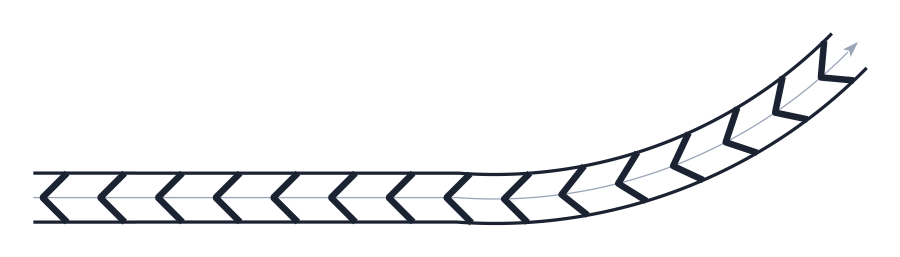
Merge, defaults: inner distance 2.1, width 0.4, channelisation 0.2, angle 90.
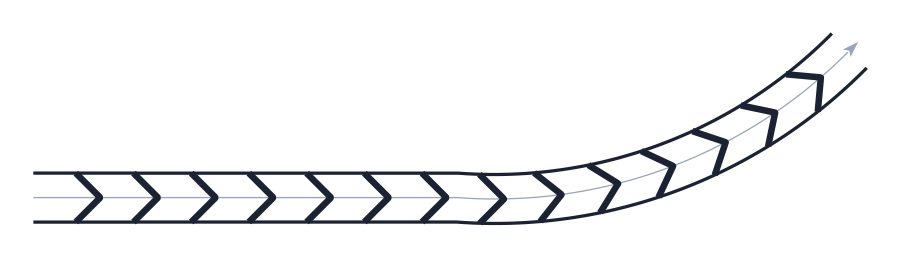
Diverge: the V opens the other way.
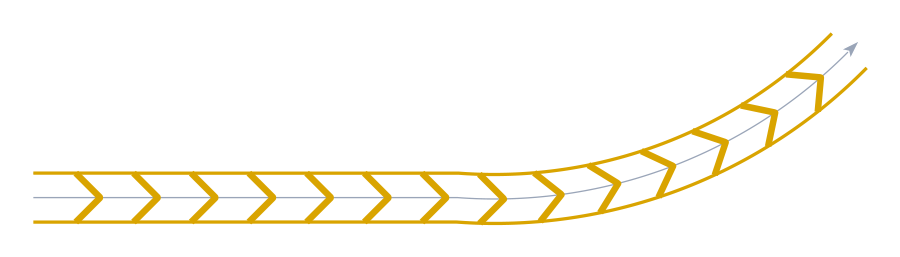
Near side (yellow): the V points along the axis.
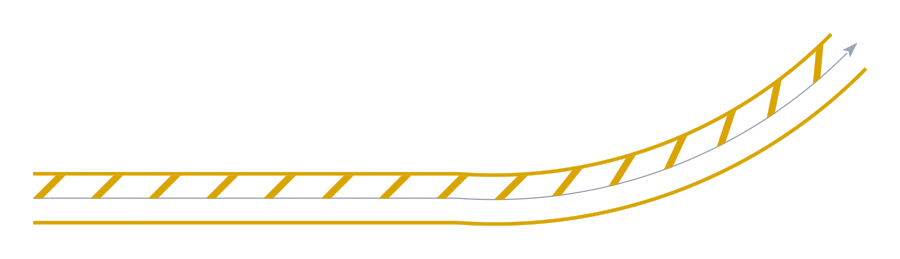
Off side in Detailed mode: single strips crossing the band. In Simplified mode this pattern draws nothing with the default angle.
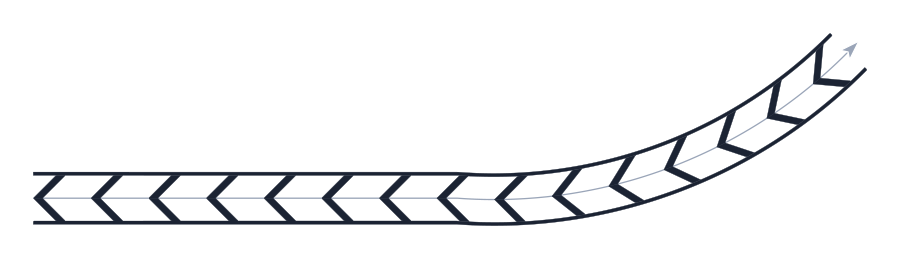
Merge in Detailed (hatch): every half V is a closed filled outline, and the edges are filled bands.
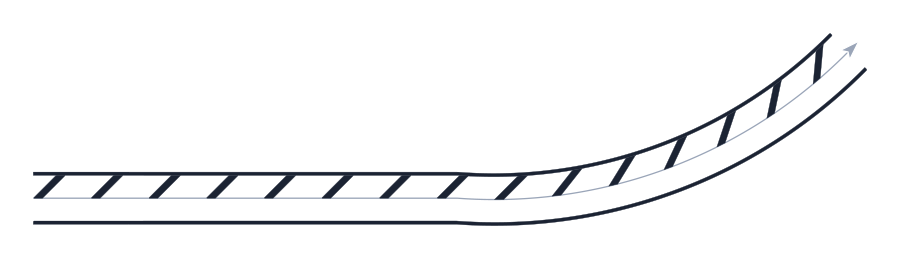
Detailed with Side 2 off: only the strips of the first edge are drawn.
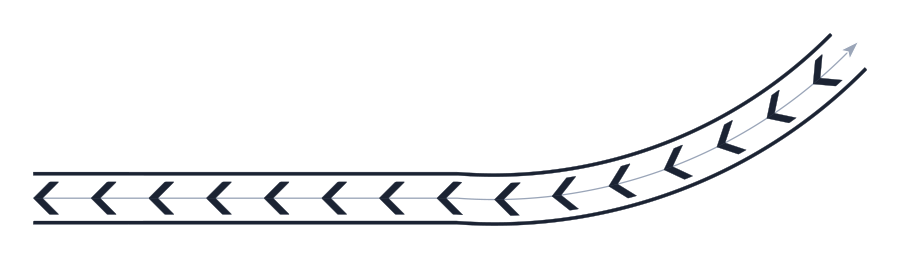
Gap between lines 0.4 (Detailed): the strips stop short of the edges.
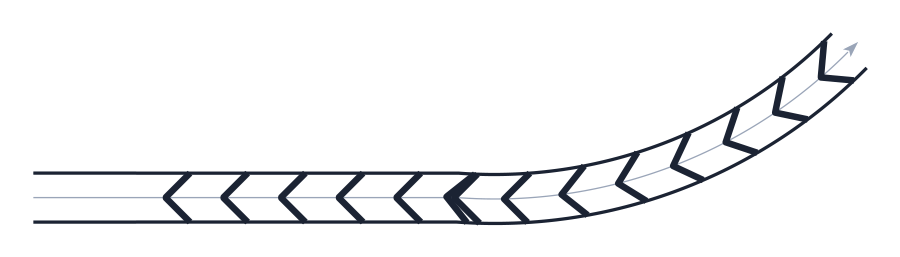
Start at 4: the first V lands 4 units into the path.
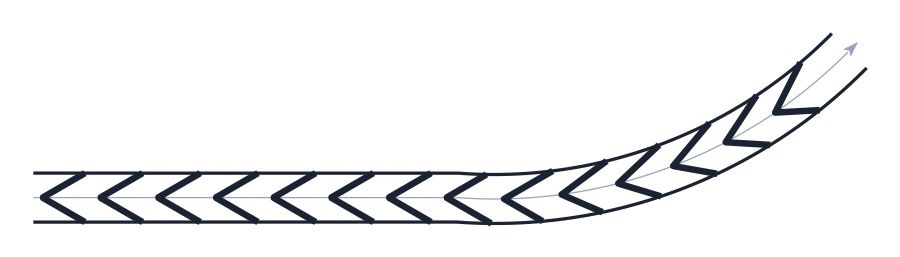
Inner angle 60: rays at 30° from the axis, a sharper V.
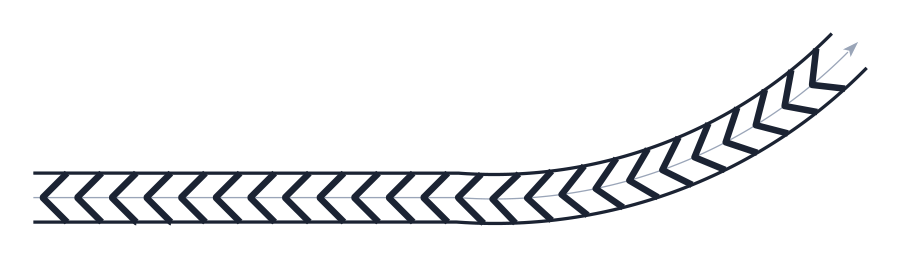
Inner distance 1.1: the Vs are (1.1 + 0.4) × √2 = 2.12 apart.
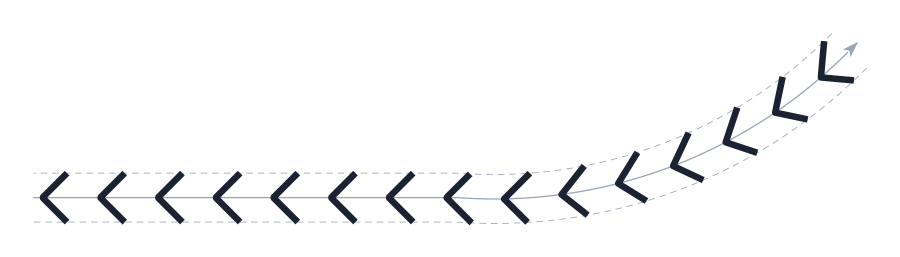
Draw exterior off: no edge lines.
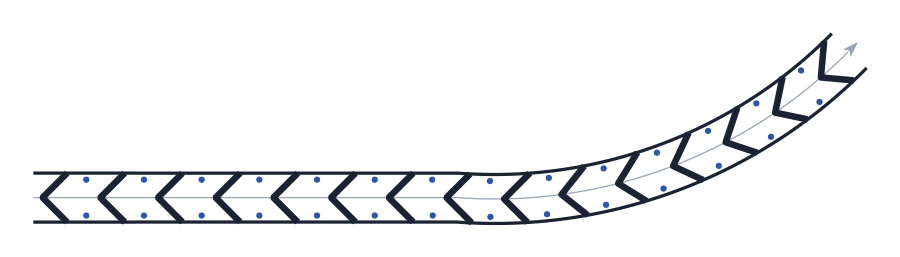
Stud: one stud (blue) per piece between strip feet on each edge, the end pieces skipped.
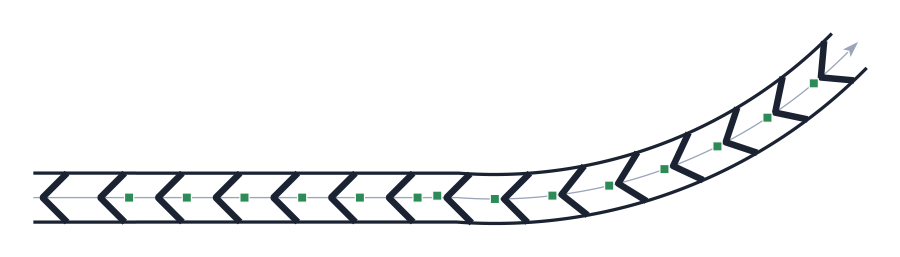
Delineator: one block (green) on the axis between every two Vs.
Remembered between sessions
Nothing. The form opens with its defaults every time (Path, Merge, widths 2 / 2, angle 90, distance 2.1, widths 0.4 / 0.2, gap 0, start 0, white layers, IMPLANTAR, stud MONO, Draw exterior, Dynamic).
Notes
- The two-flow tool (
marking-area-2-flows) fills the wedge between two converging lines; this tool fills a band of constant width along one line. The one-sided stubs are drawn by Chevron 1 side. - Closing the form keeps the last preview in the drawing.
- List… (22) and Angle incr. (9) are not available in this version; Joined / Individual (14, 15) only grey out the side boxes.
- The pattern does not change the layers: pick the yellow layers (24, 26) yourself, or load a yellow preset.
- The status texts are shown as they are written in the program: some of them are in Portuguese in the English form.