| Command | CAPCAD_MARKING_AREA_3FLOW |
| Shortcut | Z3 |
| Ribbon | CapCad tab › Traffic Control panel › Area Marking split button › 3 Flows (tooltip Chevrons: 3 Flows) |
| Category | NEW |
| Form | TresFluxosForm (modeless: the drawing stays live while it is open) |
| Hosts | AutoCAD, ARES Commander |
| Also opened by | CAPCAD_MARKING_AREA_ASSISTANT (three entities selected) |
Three legs, three corners, one click per flow. A junction island needs a different zebrado at every corner: white chevrons where the flows run the same way, yellow hatching where they oppose. This tool decides the corners from three flow toggles and draws them all at once.
- Pick the three legs (or one three-segment polyline) and the corners are found for you, closed or open.
- Flows, not families. Toggle which legs flow into the junction; the white or yellow pattern of every corner follows.
- Live preview. Spacing, widths, methods and percentages redraw the whole island as you change them.
- Two methods per colour. Triangular chevrons or one-sided stubs for the whites; hatching, triangular or stubs for the yellows.
- Trims. Keep only what is inside the island, or cut a hole around a kerb (trim reference).
- Studs per corner. Stud, big stud or delineator blocks, with a visibility per corner.
What it does
The 3-Flow Chevron tool draws the zebrado of a three-leg junction (a triangular island): the three legs are the three edges, and each corner where two legs meet receives its own marking. Which marking depends on the flows: a corner between two legs that flow the same way (both into the junction or both out of it) is white and gets triangular chevrons (Merge or Diverge); a corner between opposing legs is yellow and gets hatching (Off side or Near side). How far each corner extends along its legs is set as a percentage of the leg length.
When the three legs close a triangle the junction is closed and has three corners; when only two joints touch it is open and has two.
Everything is a live preview: every change on the form erases the previous result and redraws it. Accept keeps the result and frees the form for the next junction.
Workflow
- Run
CAPCAD_MARKING_AREA_3FLOW(or typeZ3). The form opens beside the drawing. - Click Select (1) and pick the three legs (prompt Select the 3 junction legs (or one open 3-segment polyline)). The island is drawn at once with all corners yellow.
- Toggle the Flows (5, 6, 7) that run into the junction. The corner colours follow, and the Types box (58) tells which family each corner got.
- Set Inner distance (9), Inner width (10) and Channelisation (11), or load a Preset (44).
- Choose the methods for the white (14, 15) and yellow (16 to 19) corners and adjust the percentages (26 to 31).
- On the Studs/Options tab pick the studs (46 to 54).
- Click Accept (4) to keep the result, Reset (3) to erase it, Update (2) to redraw it.
The form
Numbers are the same in every screenshot of this page. The left column is shared by both tabs; the complement boxes (29 to 31) appear only with Individual side on.
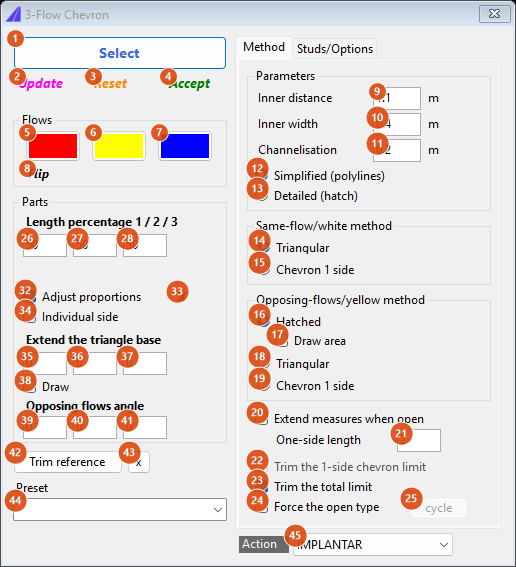
Tab 1: Method, default state (Simplified, Triangular whites, Hatched yellows, Trim the total limit).
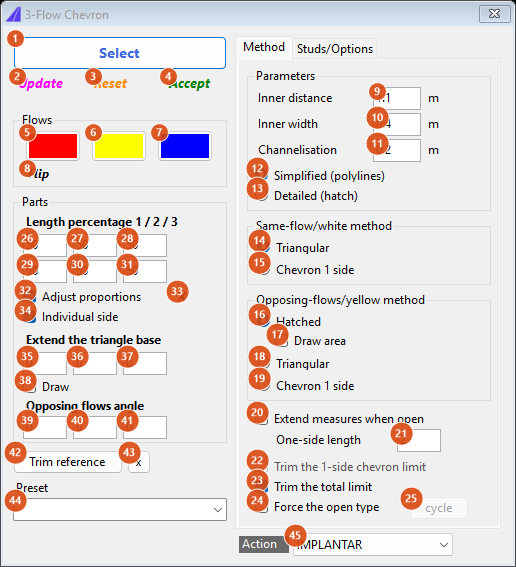
Individual side on: the second row of percentages (29 to 31) appears.
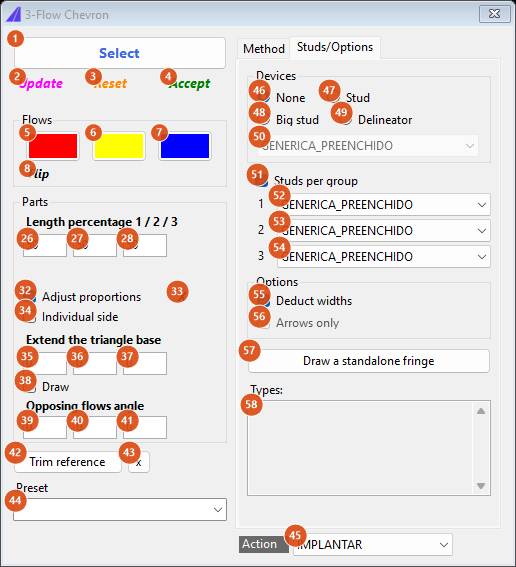
Tab 2: Studs/Options, default state (None, Studs per group).
Selection and flows (left column)
| # | Control | What it does |
|---|---|---|
| 1 | Select | Hides the form and picks the legs: three curves that touch end to end, or one open polyline with exactly three segments, which is split into the legs. A single closed polyline is refused. |
| 2 | Update (magenta) | Redraws the preview with the current values. |
| 3 | Reset (orange) | Erases the preview. |
| 4 | Accept (green) | Keeps the preview as ordinary entities and forgets the legs and the trim reference. Status: Aceito. Selecione novas geometrias. |
| 5, 6, 7 | Flows (red, yellow, blue) | One toggle per leg, in the order they were picked: pressed = the traffic on that leg flows towards the junction. The table below gives the corner families. |
| 8 | Flip | Inverts the three toggles at once and redraws. |
| status line | Selection ok after the pick; then N franja(s), M lado(s). after every redraw. |
Corner families from the flows (corner 1 is between legs 1 and 2, corner 2 between legs 2 and 3, corner 3 between legs 3 and 1; the third corner exists only in a closed junction):
| Leg 1 | Leg 2 | Leg 3 | Corner 1 | Corner 2 | Corner 3 |
|---|---|---|---|---|---|
| out | out | out | Off side (yellow) | Off side (yellow) | Off side (yellow) |
| in | out | out | Merge (white) | Off side (yellow) | Diverge (white) |
| out | in | out | Diverge (white) | Merge (white) | Off side (yellow) |
| out | out | in | Off side (yellow) | Diverge (white) | Merge (white) |
| in | in | out | Near side (yellow) | Merge (white) | Diverge (white) |
| in | out | in | Merge (white) | Diverge (white) | Near side (yellow) |
| out | in | in | Diverge (white) | Near side (yellow) | Merge (white) |
| in | in | in | Near side (yellow) | Near side (yellow) | Near side (yellow) |
Parts (left column)
| # | Control | What it does |
|---|---|---|
| 26, 27, 28 | Length percentage 1 / 2 / 3 | How far, in percent of the leg length, a corner's marking extends along its legs. Default 50: each corner takes half of each leg it touches. |
| 29, 30, 31 | complements | The share left to the other corner on the same leg. Kept at 100 − the first row automatically; visible and editable only with Individual side on. |
| 32 | Adjust proportions | Not available in this version. |
| 33 | X | Resets the three percentages to 50 and redraws. |
| 34 | Individual side | Shows the complement boxes (29 to 31) and stops updating them automatically. |
| 35, 36, 37 | Extend the triangle base | One value per corner (1, 2, 3): the boundary triangle of a yellow hatched corner is offset inwards by this distance before hatching, so a positive value makes the hatched triangle smaller. |
| 38 | Draw | Draws the boundary triangle of every corner on layers CAPCAD_AUX_1, _2, _3. Only has an effect together with Draw area (17), which is what makes the boundaries available. |
| 39, 40, 41 | Opposing flows angle | One value per corner, in degrees, added to the hatch angle of the yellow corners (0 = the angle derived from the triangle). |
| 42 | Trim reference | Prompt Select the trim reference (ilha): a closed curve whose inside is removed from every strip, a hole for a kerb or a physical island. |
| 43 | x | Forgets the trim reference and redraws. |
| 44 | Preset | Loads distance / inner width / channelisation and redraws, from the presets of the active country profile. The Brazilian presets are listed on the Portuguese page. |
| 45 | Action | IMPLANTAR draws on the base layers; MANTER, REMOVER and REVITALIZAR add the _MAN, _REM or _REV suffix to every layer. |
Tab 1: Method
| # | Control | What it does |
|---|---|---|
| 9 | Inner distance (m) | Spacing of the strips. It is multiplied by √2 and then adjusted slightly so that every leg holds a whole number of spacings. |
| 10 | Inner width (m) | Width of the strips. A value above 5 is read as centimetres. |
| 11 | Channelisation (m) | Width of the leg segments each corner uses, which are always drawn as channelisation lines (LCA layer) alongside the strips. |
| 12 | Simplified (polylines) | Strips are polylines with constant width (default). |
| 13 | Detailed (hatch) | Strips are closed outlines filled with a solid hatch when drawn. Applies to all three methods. |
| 14 | Triangular (same-flow / white) | White corners get V chevrons trimmed to the corner triangle, at 45° (default). |
| 15 | Chevron 1 side (white) | White corners get one-sided stubs along their legs instead (One-side length 21, angle ±45° set by the flow of the leg). |
| 16 | Hatched (opposing / yellow) | Yellow corners are filled with parallel strips at the hatch angle (default). |
| 17 | Draw area | Hatched only: also outputs the boundary triangle of each yellow corner on layer 0 (never hatched). Enabled only while Hatched is selected. |
| 18 | Triangular (yellow) | Yellow corners get V chevrons like the whites. |
| 19 | Chevron 1 side (yellow) | Yellow corners get one-sided stubs along their legs. |
| 20 | Extend measures when open | Open junction only: the two outer legs are used whole instead of their percentage. |
| 21 | One-side length (m) | Length of the stubs of the Chevron 1 side methods; also the length used by Draw a standalone fringe (57). |
| 22 | Trim the 1-side chevron limit | Keeps only the parts of the one-sided stubs that fall inside the closed outline of the three legs. Enabled only while a Chevron 1 side method is selected. |
| 23 | Trim the total limit | Keeps only the parts of the strips inside the closed outline of the three legs (default on). |
| 24 | Force the open type | Treats a closed junction as an open one. |
| 25 | cycle | Not available in this version. |
Tab 2: Studs/Options
| # | Control | What it does |
|---|---|---|
| 46 | None | No stud blocks (default). |
| 47 | Stud | Inserts the TACHA block at the stud points of every corner (along both legs of the triangular and hatched corners), on that corner's white or yellow ZPA layer. |
| 48 | Big stud | Same with TACHAO. |
| 49 | Delineator | Same with BALIZA. |
| 50 | Type (main) | Visibility state for every stud when Studs per group is off: MONO, BI, MONO_PLOTAVEL, BI_PLOTAVEL, GENERICA_VAZADO, GENERICA_PREENCHIDO (default). SEM draws no studs. |
| 51 | Studs per group | Use one visibility per corner (52 to 54) instead of the main one (default on). |
| 52, 53, 54 | 1, 2, 3 | Visibility of the studs of corner 1, 2 and 3; SEM skips that corner. |
| 55 | Deduct widths | Not available in this version: the spacing is always taken as typed. |
| 56 | Arrows only | Not available in this version. |
| 57 | Draw a standalone fringe | After a preview exists: click stations in the drawing (Station on a canalização (Esc to finish)). At the foot of each click on the nearest channelisation line, four stubs (±45°, both ways, One-side length long, Inner width wide) are drawn permanently on that corner's LCA layer. Without a preview the status says Gere o zebrado primeiro. |
| 58 | Types (read-only) | After every redraw: fechado or aberto, then the family of each corner (Merge, Diverge, OffSide, NearSide). |
How the options combine
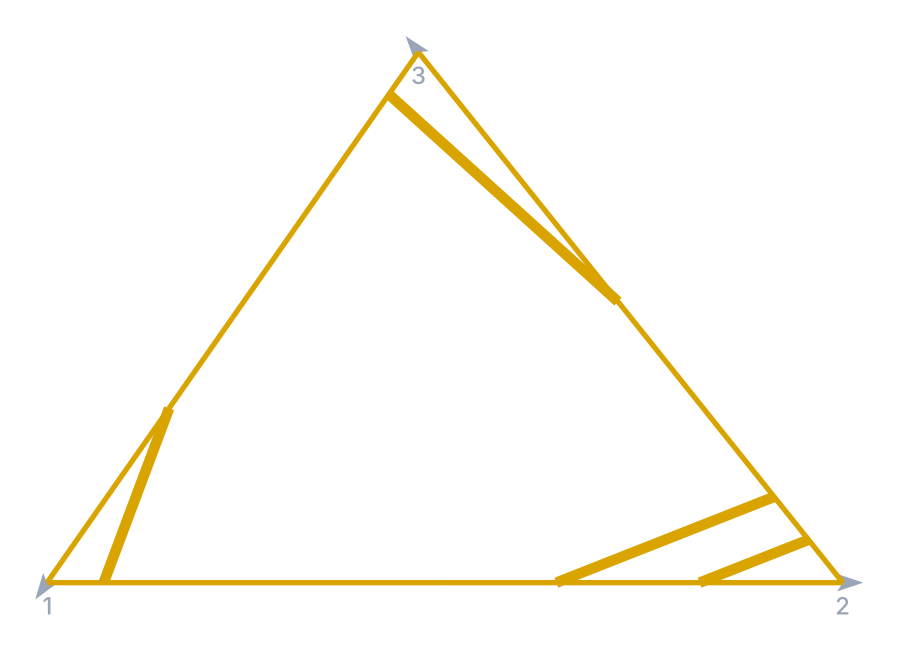
All figures were produced by running the command's own engine on the same sample island: three straight legs (grey, numbered at their start, arrow at their end) closing a triangle, defaults unless stated. White corners are black, yellow corners amber, studs blue dots.
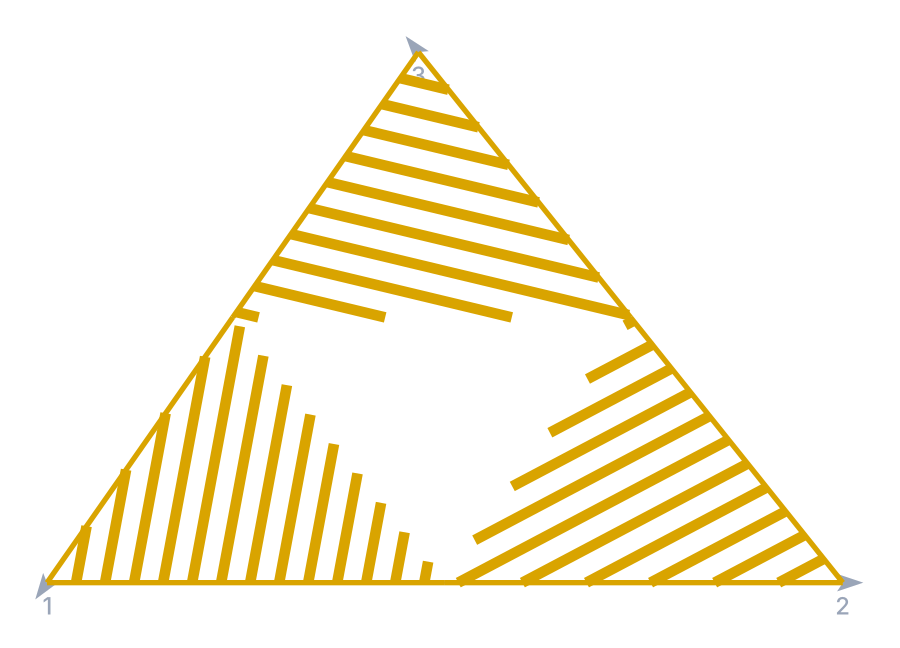
No flow toggled: every corner is Off side (yellow) and hatched.
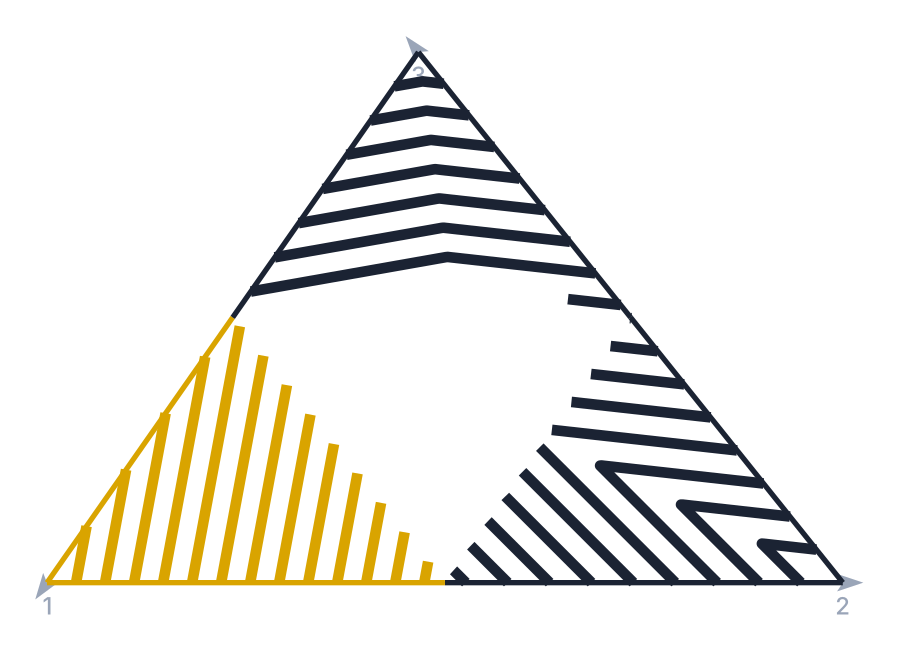
Flow 1 only: corner 1 (legs 1–2) Merge, corner 3 (legs 3–1) Diverge, both white triangular; corner 2 stays yellow.
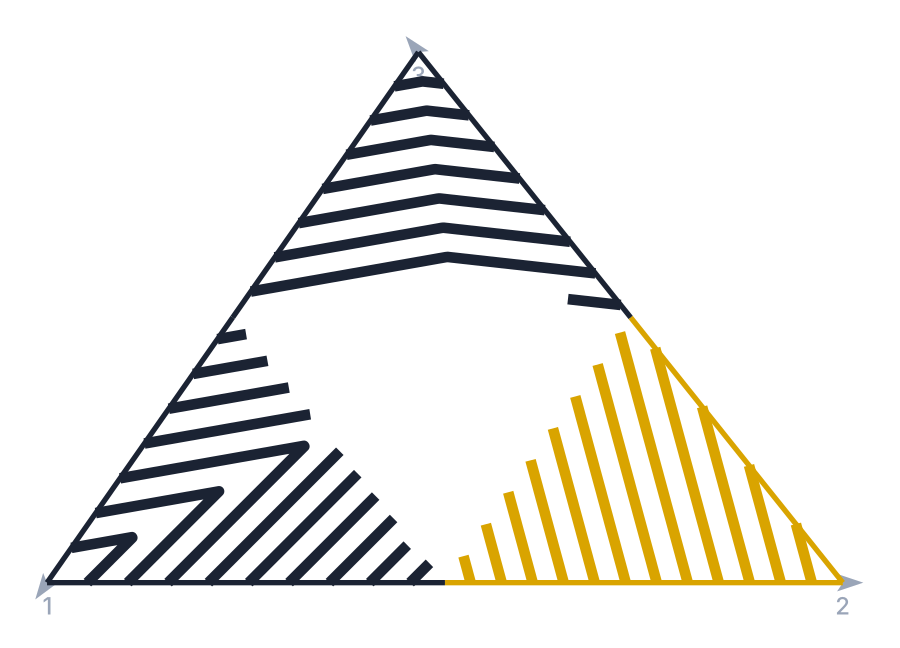
Flows 1 and 2: corner 1 becomes Near side (yellow), corners 2 and 3 white.
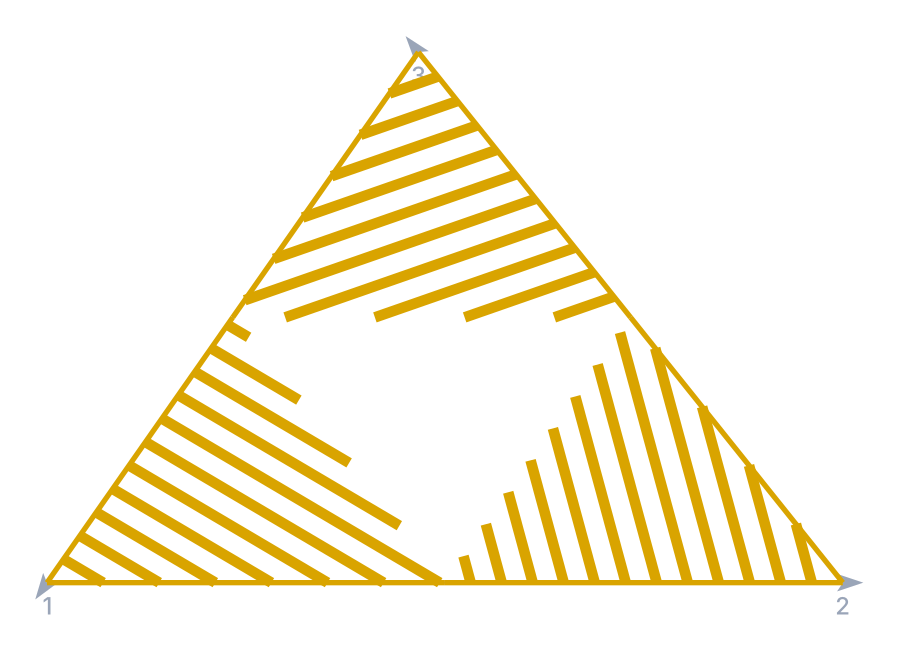
All three flows: every corner Near side (yellow).
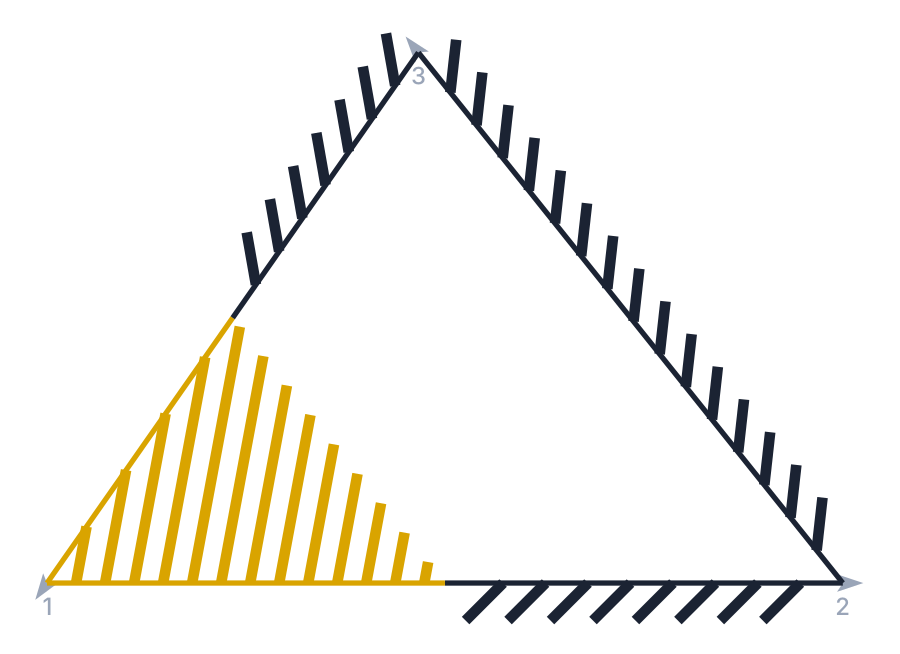
Flow 1 with Chevron 1 side for the whites: the white corners become stubs along their legs (one-side length 2).
Yellow method Triangular: the yellow corners get V chevrons instead of hatching.
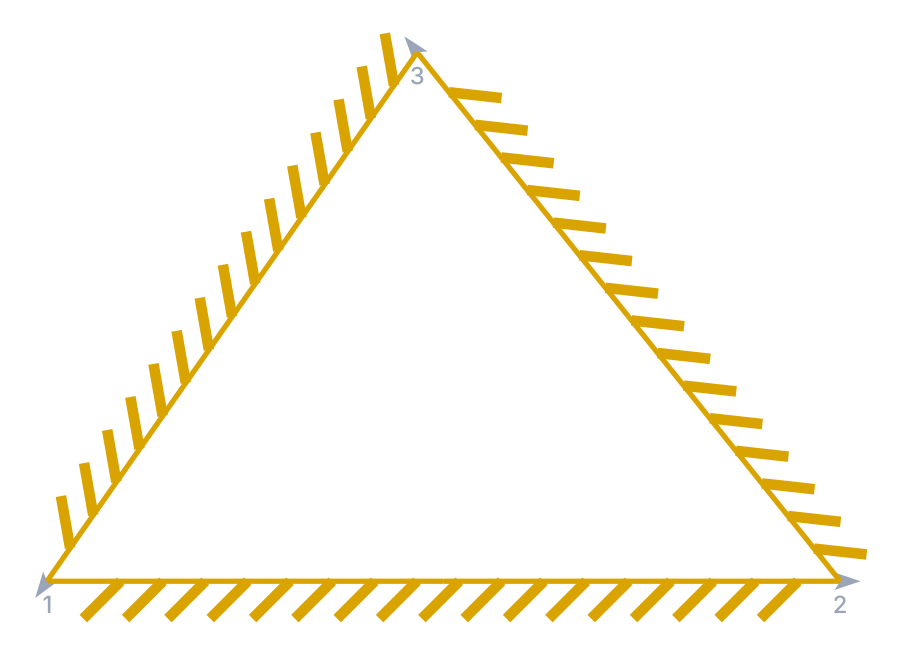
Yellow method Chevron 1 side: stubs along the legs of every yellow corner.
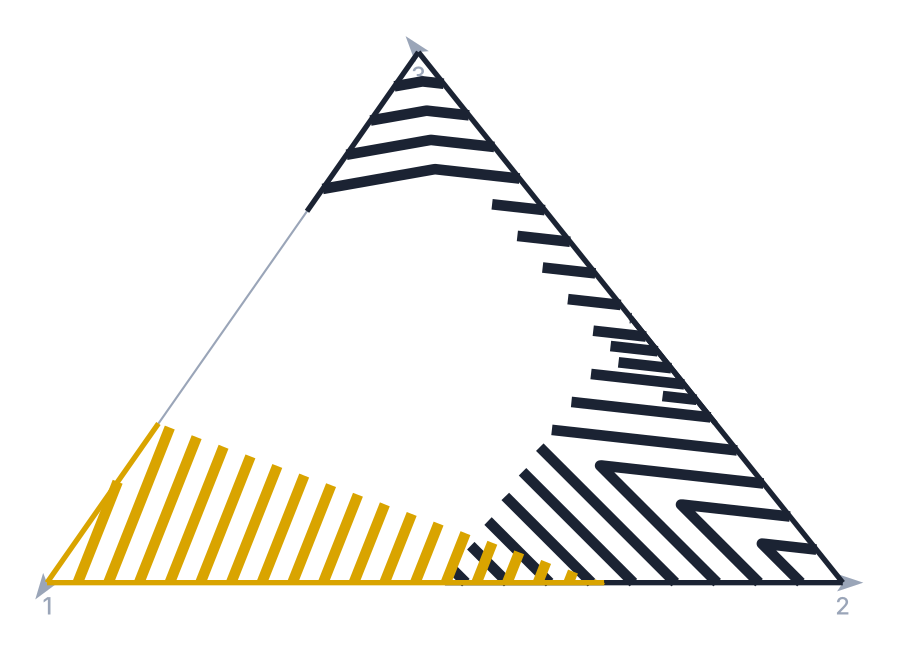
Flow 1 with percentages 30 / 70 / 50: the corners take different shares of the legs.
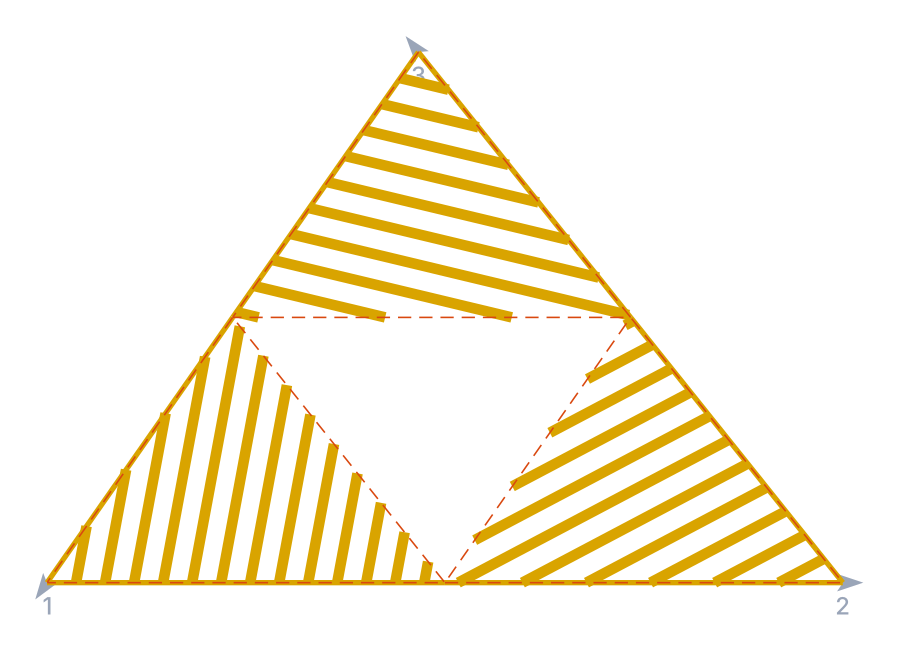
Draw area: the boundary triangle of each hatched corner (dashed) is output too.
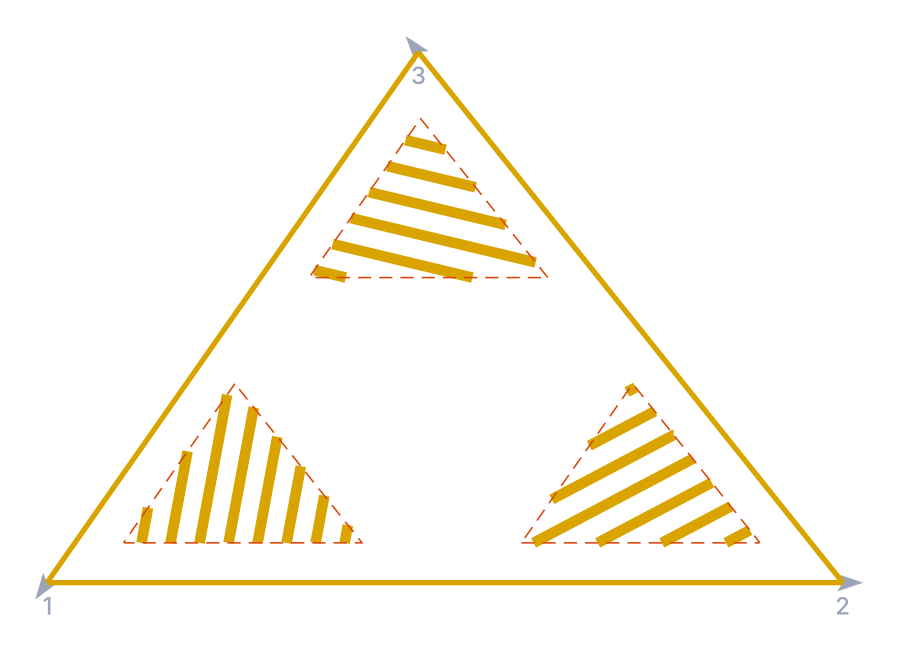
Extend the triangle base 1.5 on every corner, with Draw area: the boundary is offset inwards and the hatched triangles shrink.
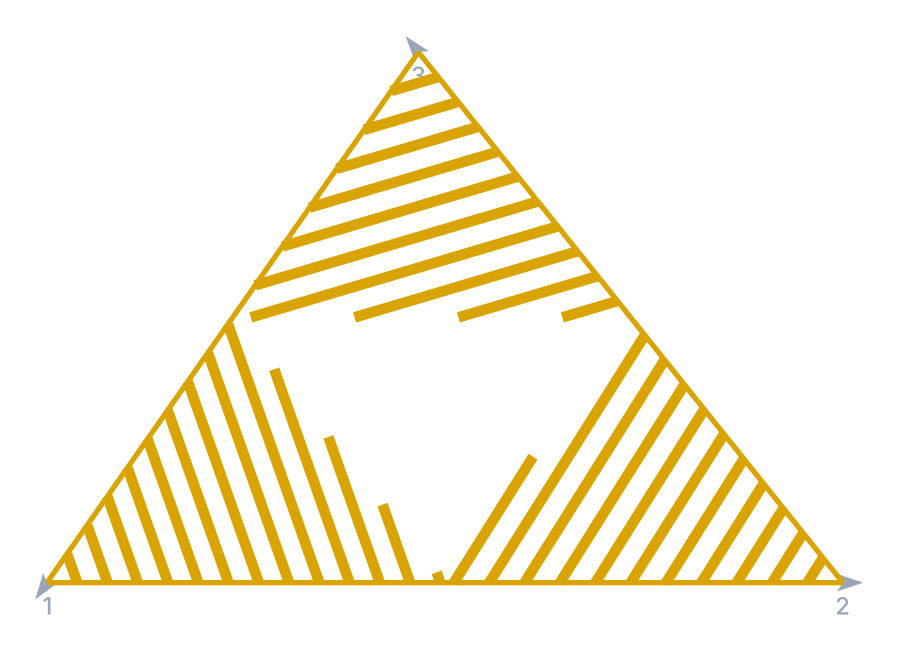
Opposing flows angle 30 on every corner: the hatch turns 30° from its derived angle.
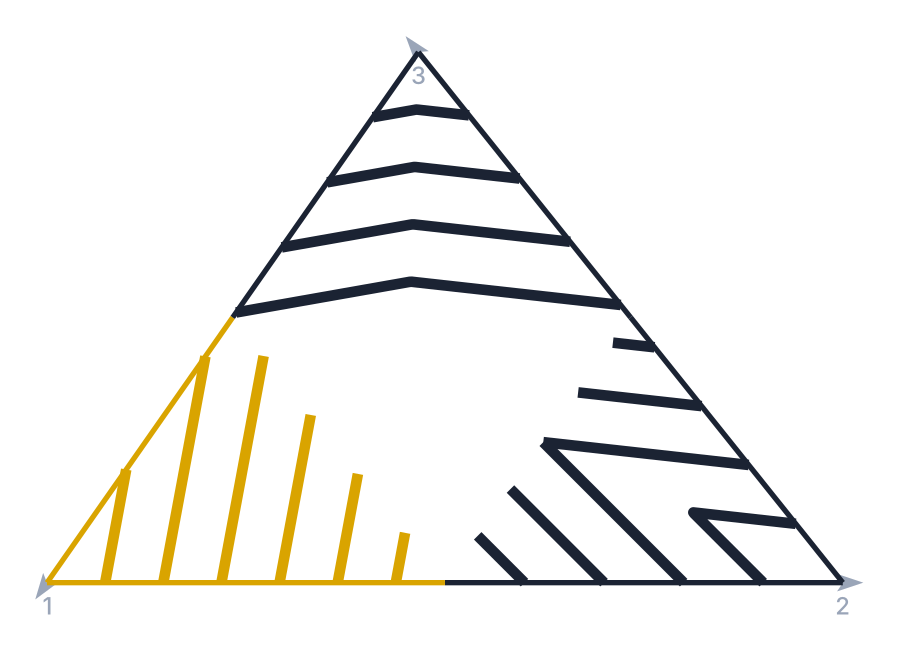
Inner distance 2.1 (rural): fewer strips per corner.
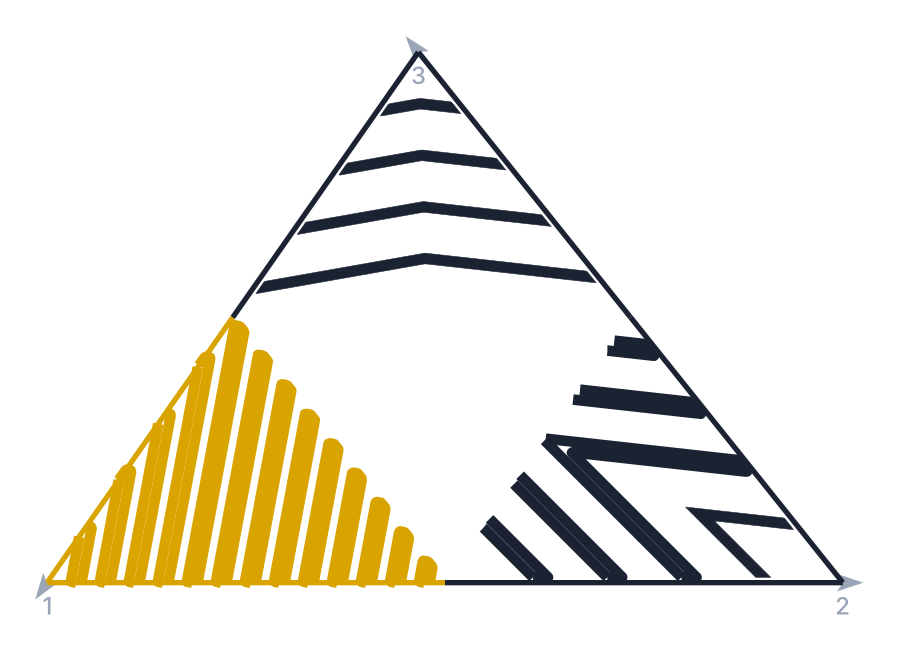
Detailed (hatch): strips as closed filled outlines.
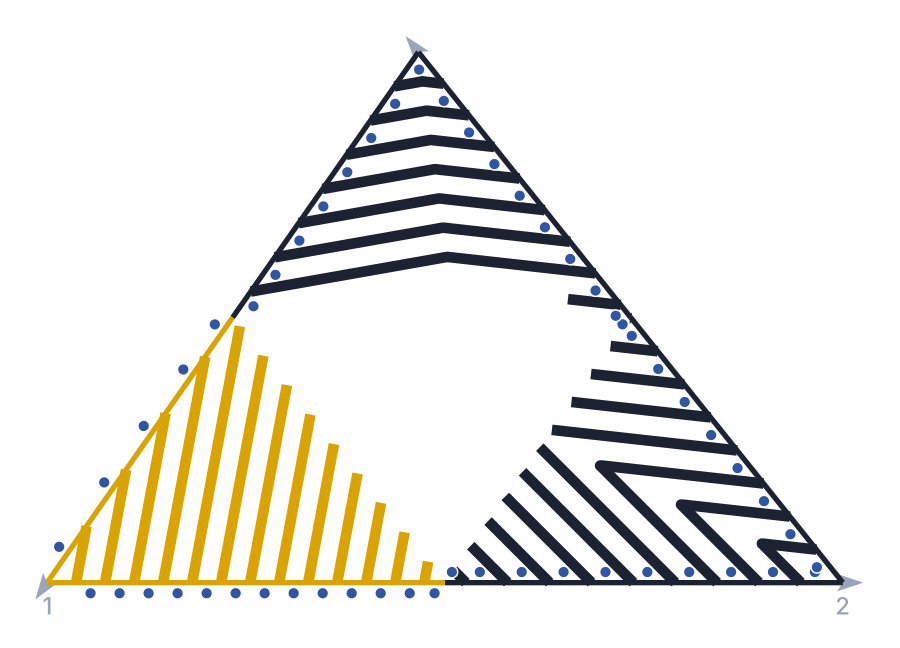
Studs: one block per piece between strip feet, along both legs of every corner.
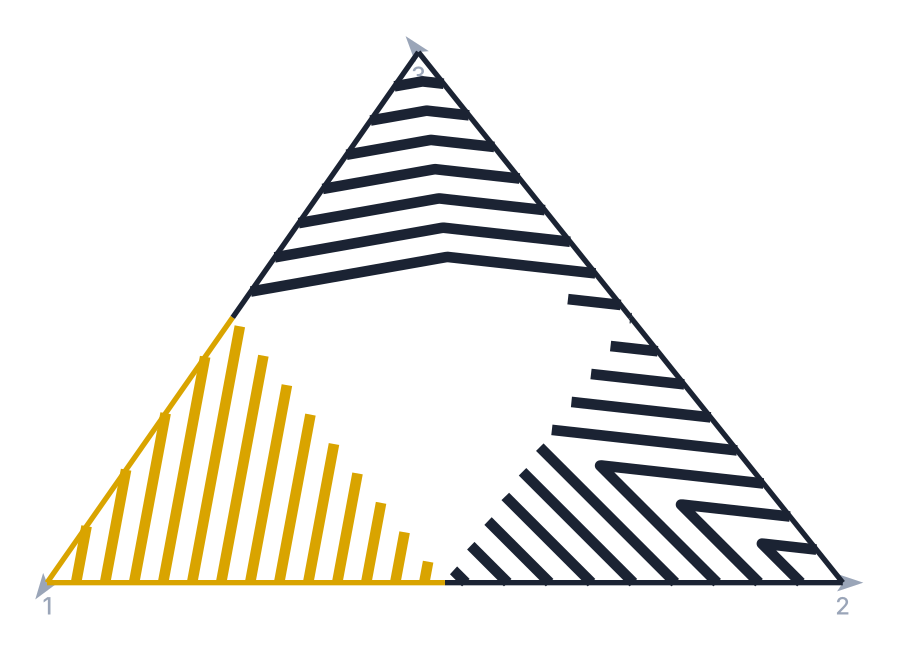
Trim the total limit off: the strips are no longer clipped to the island outline.
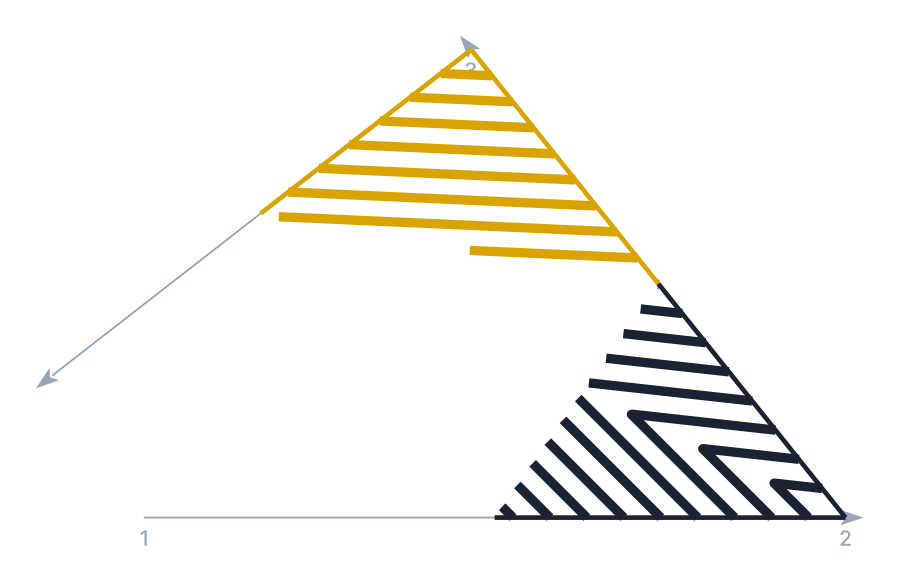
Open junction (leg 3 does not return to leg 1): only two corners, corner 1 Merge and corner 2 Off side.
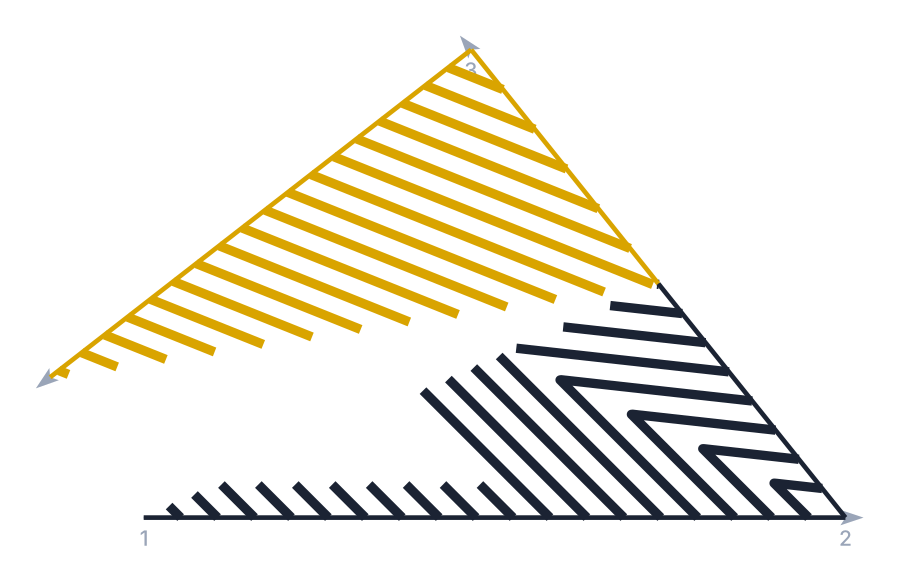
The same open junction with Extend measures when open: the outer legs are used whole.
Remembered between sessions
Nothing. The form opens with its defaults every time (flows off, percentages 50, distance 1.1, widths 0.4 / 0.2, Simplified, Triangular whites, Hatched yellows, one-side length 2, Trim the total limit, no studs, GENERICA_PREENCHIDO, IMPLANTAR).
Notes
- The white corners follow the two-flow tool (
marking-area-2-flows) with the reference (45°) method; the Chevron 1 side methods follow Chevron 1 side. - Layers: white corners go to
SINA_HOR_BR_ZPA(strips, studs) andSINA_HOR_BR_LCA(leg segments); yellow corners to theSINA_HOR_AM_*pair; the Draw area triangles to layer0. - Closing the form keeps the last preview in the drawing.
- Adjust proportions (32), Deduct widths (55), cycle (25) and Arrows only (56) are not available in this version.
- The status texts are shown as they are written in the program: some of them are in Portuguese in the English form, and some messages are shown as bare keys.