| Command | CAPCAD_ANALYTICS_CURVES |
| Shortcut | none |
| Ribbon | CapCad tab › Manage panel › Analytics split button › Curvas Horizontais: Vertical de advertência; the same command also sits on the Vertical Signage panel › Vertical button › Assistente Vertical: MAs e placas de curva em lote |
| Category | Analytics |
| Form | CurvesForm — "Curve Utilities", tabs Eixo, Curves, Parameters and Signs. Modal: the drawing is locked while it is open |
| Hosts | AutoCAD, BricsCAD, GstarCAD, ZWCAD, ARES Commander |
| Also opens | MA options... opens the MAs form (VerticalMaForm), the same one CAPCAD_MA uses |
It reads the alignment's geometry, answers which warning sign each curve needs, and then places the signs at the right station on its own. No CAD command knows what a sharp curve is: to the CAD, an arc is just an arc.
- Classified against the criteria, not by eye. Each segment's radius and central angle go into the sharp-curve and signable-curve tests, with the thresholds on screen and editable.
- It sees the set, not the isolated curve. Curves separated by a short tangent become one group, and it is the group that decides between a single-curve sign, a reverse-curve (S) sign and a winding-road sign.
- It knows which way the curve turns. The sense of the deflection picks the left-hand or right-hand sign of each family, and every group gets the full pair: one sign for the driver going up-station and one for the driver going down.
- The sign lands before the curve, not on it. The setback from the PC is a distance along the alignment, and the same setback is applied after the PT for the opposite direction.
- It does the delineators too. The same classified curves can receive their delineators in one pass, with the method chosen on the MAs form.
- It runs without touching the drawing when you only want to look. Identify mode draws the classified curves on their own layers, coloured by class, so you can check before anything is inserted.
What it does
A signable curve is a horizontal curve tight enough to require a warning sign. The command walks the project alignment segment by segment and does three things:
- Classifies every segment that has curvature. Two purely geometric quantities come out of each segment: the radius and the central angle (the deflection). With them the segment falls into sharp, signable or neither.
- Groups neighbouring curves. A tangent between two curves shorter than the minimum tangent does not break the set: it is absorbed into the group. That is what turns two nearby reverse curves into an S curve and three or more into a winding stretch.
- Emits the result — drawing the groups, inserting the signs, or inserting the delineators, according to the option ticked on the Curves tab.
What the alignment has to supply
The command works on the project alignment (the one defined by the Alignment Manager). No per-station property is needed: the classification is geometric, read from the polyline's bulges. Only Identify mode will work without a project alignment — it then asks you to pick one curve. Insert vertical signs and MAs require the project alignment and refuse to run without it.
The three modes
| Option on the Curves tab | What it produces |
|---|---|
| Identify signable horizontal curves (8) | Redraws each classified curve as a polyline of constant width 10, on one layer per class, and prints the group report on the command line. Inserts nothing. |
| Insert vertical signs on signable horizontal curves (12) | Expands each group into two signs — the up-station one before the PC and the down-station one after the PT — and inserts them as CapCad signs. |
| MAs (23) | Inserts the delineators on the curves selected by the three type check boxes, with the method and options of the MAs form. |
The layers Identify mode draws on, and their colours:
| Class | Layer | Colour |
|---|---|---|
| sharp curve | CAPCAD_CURVA_ACENTUADA |
1 (red) |
| signable curve | CAPCAD_CURVA_SINALIZAVEL |
2 (yellow) |
| U curve (second country profile only) | CAPCAD_CURVA_U |
5 (blue) |
| absorbed short tangent | CAPCAD_CURVA_TANGENTE |
8 (grey) |
Workflow
- Define the project alignment and run
CAPCAD_ANALYTICS_CURVES. The form opens on the Curves tab, with the orange line Apenas projeto: <name> at the top when a project is active. - Check the Profile (28). It decides which set of classification criteria and which set of sign codes are used.
- Go to the Parameters tab and check the radius and angle thresholds. Any of them can be edited, and Reset values to defaults (42) restores those of the selected profile.
- Back on Curves, check the A2 central-angle method (19 or 20) — the two readings of criterion 2 give opposite answers, so this is the one setting worth looking at before every run.
- Choose the mode (8, 12 or 23) and set PC offset (13), minimum tangent (17) and Alignment offset (15, 16).
- Click Create (61). The form closes, the command runs, and the result is reported on the command line.
- Running Identify first shows you the coloured groups on the plan, so you can tune the minimum tangent before letting the command insert anything.
The form
The numbers are the same in every figure on this page: 1 to 7 on the Eixo tab, 8 to 28 on Curves, 29 to 42 on Parameters, 43 to 60 on Signs, and 61 on the Create button, which sits outside the tabs and shows in every capture.
The screenshots are of a Portuguese session, and so are the labels inside the generated figures further down. The layout, the control numbering and the geometry are identical in an English session. The English captions of each control are the ones quoted in the tables.
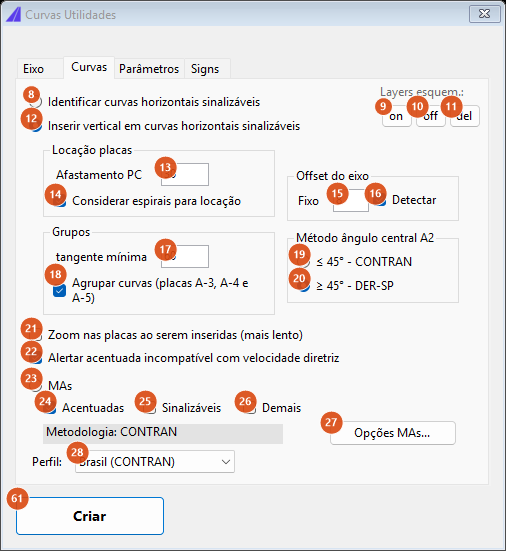
The Curves tab, the form as it opens: the sign-insertion mode is already selected.
Tab 2: Curves
Mode
| # | Control | What it does |
|---|---|---|
| 8 | Identify signable horizontal curves | Classifies and draws the groups without inserting anything. With no project alignment the command asks you to pick one curve — this is the only mode that accepts that. It reports the number of groups and, per group, the number of curves and the group length, then the count of entities drawn. |
| 12 | Insert vertical signs on signable horizontal curves | Selected by default. Inserts the warning signs of every group (see How the options combine). Before it starts, the command checks that all of the profile's sign codes exist in the project's sign folders; if any is missing nothing is inserted and it lists the ones it could not find, so configure the sign folders and run again. |
| 23 | MAs | Inserts the delineators. It walks the same segments with the same criteria and does, per curve, the same as CAPCAD_MA. |
Sign siting
| # | Control | What it does |
|---|---|---|
| 13 | PC offset | Distance in metres along the alignment between the curve and the sign. The up-station sign goes to PC − offset and the down-station one to PT + offset. A sign whose station falls outside the alignment element is discarded and counted as off alignment in the summary. Default 30. |
| 14 | Consider spirals when siting | Extend the group to the transition spirals. Ticked by default but no effect in this version: the siting uses the circular arc only. |
Groups
| # | Control | What it does |
|---|---|---|
| 17 | minimum tangent | Length in metres below which a tangent between two curves is absorbed into the group instead of ending it. Consecutive tangents are accumulated and compared against this value, and tangents left over at the end of a group are discarded — a group always ends on a curve. Values outside 0–1000 are refused. Default 60. |
| 18 | Group curves (A-3, A-4 and A-5 signs) | No effect in this version. Grouping always happens, governed by the minimum tangent (17) alone. The caption names the sign codes of the Brazilian profile. |
Alignment offset
| # | Control | What it does |
|---|---|---|
| 15 | Fixed | Perpendicular distance in drawing units between the alignment and the sign support. Used when Detect is off. Default 8. |
| 16 | Detect | Ticked by default. Instead of the fixed value, the setback is measured in the drawing: the command casts a probe line from the sign's foot on the alignment, perpendicular to it and on the sign's side (tangent − 90° up-station, tangent + 90° down-station), reaching 100 m up-station and 20 m down-station, and takes the farthest entity that line crosses, plus a fixed 4 of clearance, capped at 50. Layers whose name contains eixo are ignored by the probe; if nothing is crossed the setback becomes 9. The alternative path — using the carriageway edges declared in the alignment definition — is not available in this version. |
A2 central-angle method
Criterion 2 of the normal signable curve exists in two conflicting readings, and the form makes you pick one. The two radios sit in the same group, so one of them is always selected.
| # | Control | What it does |
|---|---|---|
| 19 | ≤ 45° | The curve of criterion 2 is signable when the central angle is less than or equal to the threshold (41). The caption is ≤ 45° followed by the name of the body whose manual that reading comes from; it is not translated. |
| 20 | ≥ 45° | The curve of criterion 2 is signable when the central angle is greater than or equal to the threshold. This is the option selected by default, and its caption is ≥ 45° followed by the other body's name. |
Output and warnings
| # | Control | What it does |
|---|---|---|
| 9, 10, 11 | on, off, del (top right, under Layers esquem.) | Turn on, turn off and erase the contents of the schematic-curve layers. The filter is any layer name containing ALIGNMENT_CURVAS_SINALIZAVEIS_VELO_, ALIGNMENT_CURVAS_ACENTUADAS_VELO_ or TANGENTE_MINIMA_. del erases the model-space entities on those layers and reports how many were removed; there is no confirmation. See the note about these three buttons at the end of the page. The label and the three captions are untranslated. |
| 21 | Zoom to the signs as they are inserted (slower) | No effect in this version. |
| 22 | Warn when a sharp curve conflicts with the design speed | No effect in this version: the speed branch of the criteria (31, 34) is not evaluated. Ticked by default. |
MAs
| # | Control | What it does |
|---|---|---|
| 24 | Sharp | Include the curves classified as sharp in the delineator run. Ticked by default. |
| 25 | Signable | Include the normal signable curves. |
| 26 | Others | Include every segment with curvature that is neither sharp nor signable. |
| 27 | MA options... | Opens the MAs form — spacing method, block, representation, offset. On closing, the grey Method: label beside it is refreshed. The options are kept for as long as the CAD stays open. See Vertical Assistant and MAs. |
With MAs selected and none of the three type boxes ticked, Create refuses and stays open. On the second country profile the MAs mode is not available in this version and inserts nothing.
Profile
| # | Control | What it does |
|---|---|---|
| 28 | Profile | Two country profiles. Switching changes the set of classification criteria and the set of sign codes. The second profile adds a third class, the U curve, for deflections beyond its 120° threshold. The first entry's caption also names the Brazilian body, untranslated. |
Tab 1: Eixo
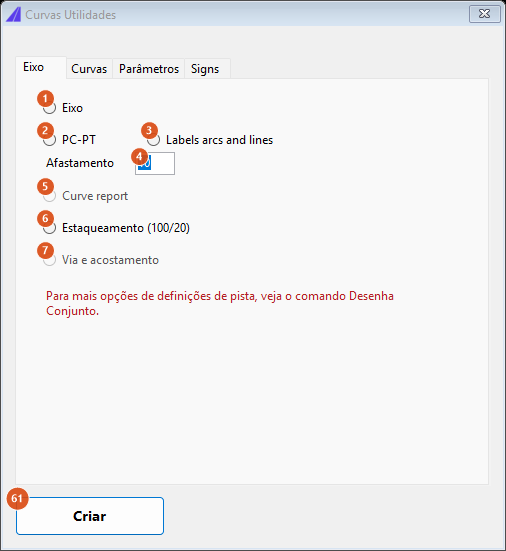
The Eixo tab gathers four alignment-drawing utilities; two options are shown disabled. The tab caption and its controls are not translated.
These actions only run when no option on the Curves tab is selected — Curves takes precedence. All of them require the project alignment.
| # | Control | What it does |
|---|---|---|
| 1 | Eixo | Draws the project alignment into the drawing and reports how many elements were drawn. |
| 2 | PC-PT | Inserts the alignment's PC and PT annotations, offset by the value in 4. |
| 3 | Labels arcs and lines | Inserts the arc and line labels (radii and lengths), offset by the value in 4. |
| 4 | Afastamento | Offset in metres of the annotations of 2 and 3 from the alignment. Default 10. |
| 5 | Curve report | Not available in this version. |
| 6 | Estaqueamento (100/20) | Inserts the chainage marks along the alignment and reports how many. For chainage with control over the intervals, use CAPCAD_ALIGNMENT_CHAINAGE. |
| 7 | Via e acostamento | Not available in this version. The tab itself says in red that the carriageway definitions live in the Draw Set command. |
Tab 3: Parameters
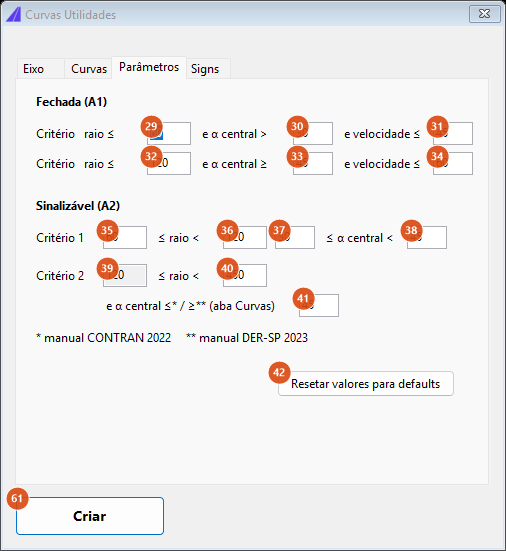
The Parameters tab shows the two criteria with editable thresholds. The footnote line names the two manuals behind the two readings of criterion 2, untranslated.
The values below are the ones the form opens with. They are the thresholds of the first country profile; the second profile ignores this tab entirely (see Notes).
Sharp (A1)
Two bands, evaluated in sequence; either one makes the curve sharp.
| # | Control | What it does |
|---|---|---|
| 29 | criterion 1 radius | Upper radius bound of the first band: the curve is sharp when the radius is less than or equal to this value and the central angle is greater than 30. Default 60. |
| 30 | criterion 1 central angle | The minimum central angle in degrees of the first band. Default 30. |
| 31 | criterion 1 speed | No effect in this version: the speed branch of the classification is not evaluated. Default 45. |
| 32 | criterion 2 radius | Upper radius bound of the second band. The comparison is strictly less than. Default 120. |
| 33 | criterion 2 central angle | The minimum central angle in degrees of the second band (compared greater than or equal). Default 45. |
| 34 | criterion 2 speed | No effect in this version, like 31. Default 60. |
Signable (A2)
| # | Control | What it does |
|---|---|---|
| 35 | criterion 1 start radius | Default 60. |
| 36 | criterion 1 end radius | Default 120. |
| 37 | criterion 1 start central angle | Default 30. |
| 38 | criterion 1 end central angle | Default 45. |
| 39 | criterion 2 start radius | No effect in this version: the field is filled with the value of 36 when the form opens, and the value of 36 is what is used as the start radius of criterion 2. Default 120. |
| 40 | criterion 2 end radius | Upper radius bound of criterion 2 (compared strictly less than). Default 450. |
| 41 | criterion 2 central angle | The central-angle threshold in degrees, compared as chosen in 19/20. Default 45. |
| 42 | Reset values to defaults | Reloads every field on this tab with the default values of the profile selected in 28. |
Criterion 1 of the signable curve (35 to 38) has no effect in this version — see the note at the end of the page. In practice the signable class is decided entirely by criterion 2.
Tab 4: Signs
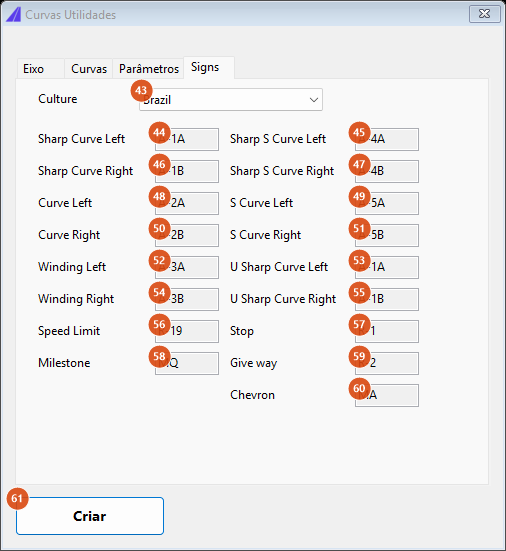
The Signs tab shows the sign codes of each catalogue. Every field is read-only: it is a lookup, not a setting.
| # | Control | What it does |
|---|---|---|
| 43 | Culture | Three country catalogues. Switching changes the codes shown below. This list is independent of the Profile (28): changing it does not change what the command inserts. |
| 44 to 55 | the twelve curve fields | The curve-sign codes of the catalogue selected in 43, one per role: Sharp Curve Left / Right, Curve Left / Right, Winding Left / Right, Sharp S Curve Left / Right, S Curve Left / Right, U Sharp Curve Left / Right. Read-only. |
| 56 to 60 | Speed Limit, Stop, Milestone, Give way, Chevron | The codes of the other five roles, read from that country's sign catalogue (Chevron shows the delineator block the MAs would use). A role the catalogue does not define shows blank. Read-only. |
Two of the twelve curve roles have no sign of their own in the first catalogue: the U-sharp-curve pair repeats the sharp-curve pair. The code tables themselves are Brazil-, Colombia- and Peru-specific and are listed on the Portuguese edition of this page.
How the options combine
What makes a curve signable
The criteria are two radius-and-angle bands for the sharp class and, in practice, one band for the signable class. The switch in 19/20 flips the angle test of that band, and the two readings are near-complements of each other: with the default thresholds, a curve of radius 200 m deflecting 60° is signable under the ≥ 45° reading and not under ≤ 45°; one of radius 200 m deflecting 20° is signable under ≤ 45° and not under ≥ 45°. Same curve, opposite answer — which is why the method is worth checking before every run.
Segments 10 m long or shorter never classify as a curve, however tight: the command treats them as straight.
The criteria maps that show this on the Portuguese page are labelled with the two bodies' names and with the sign codes, so they are not reproduced here.
From classification to groups
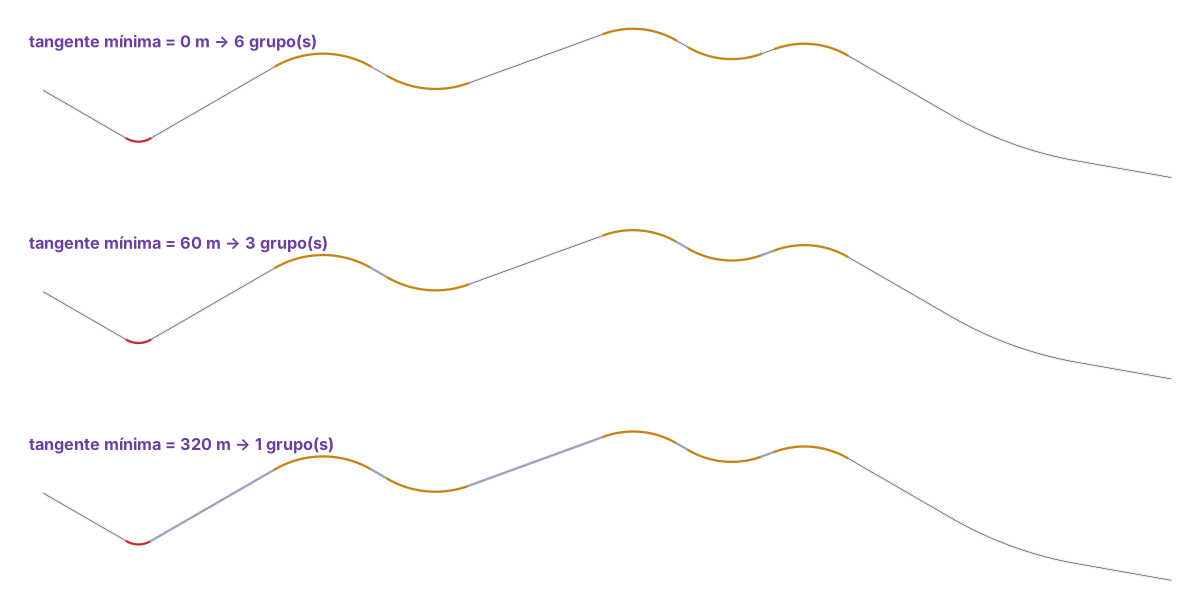
One sample alignment at three values of the minimum tangent, from a real run of the command. At 0 m no tangent is absorbed and the six curves become six independent groups — each would get its own sign. At 60 m they collapse into three groups. At 320 m the 300 m tangents are absorbed too and the whole stretch becomes a single group.
The last group of an alignment behaves differently: a group is only closed when a non-signable segment appears after it. An alignment that ends on a signable curve does not emit that last group. See the note at the end of the page.
Which sign each group gets
The choice comes from the number of curves in the group and the sense of each deflection. The codes come from the sign catalogue of the active country profile; the roles are these:
| Group | Sign role |
|---|---|
| one sharp curve | Sharp Curve Left or Sharp Curve Right |
| one signable curve | Curve Left or Curve Right |
| two adjacent curves with no tangent between them | Sharp S Curve if either of them is sharp, otherwise S Curve — the side comes from the first deflection |
| two reverse curves with an absorbed tangent between them | Sharp S Curve or S Curve, by the sense of the pair |
| two curves turning the same way, or three or more curves | Winding Left / Winding Right |
| U curve (second country profile only) | that profile's U-sharp-curve sign |
Each group receives two signs: the up-station one at PC offset metres before the group's PC, and the down-station one the same distance after its PT. Every sign of one run receives the same group identifier, so CAPCAD_SELECT_GROUP can reselect them later. The sign action is always install, and it is the action that decides the layer.
The figure of the classified alignment and the figure showing where the signs land are labelled with the sign codes of the Brazilian catalogue, so they are not reproduced here.
Remembered between sessions
Nothing. The form is built from scratch on every run and discarded at the end: every value returns to its default (mode Insert vertical signs, PC offset 30, minimum tangent 60, offset 8 with Detect on, the ≥ 45° A2 method, the first country profile).
The one exception is the MA options (27), which are kept for as long as the CAD stays open — they are the same ones CAPCAD_MA uses, shared by both.
Notes
- Criterion 1 of the signable curve (35 to 38) has no effect in this version. The signable class comes entirely from criterion 2; the four fields stay editable and have no effect.
- One A2 method is always selected. The two radios (19, 20) share one group box; the default is the
≥ 45°reading, and it is applied silently if you never look at the tab. - The three layer buttons (9, 10, 11) do not act on the layers this command creates. They filter on
ALIGNMENT_CURVAS_SINALIZAVEIS_VELO_,ALIGNMENT_CURVAS_ACENTUADAS_VELO_andTANGENTE_MINIMA_, while Identify mode draws onCAPCAD_CURVA_ACENTUADA,CAPCAD_CURVA_SINALIZAVEL,CAPCAD_CURVA_UandCAPCAD_CURVA_TANGENTE. In practice the buttons only find layers from earlier analyses; to erase what this command drew, use the layers above directly. - An alignment ending on a signable curve loses its last group. Grouping only closes a group when it meets a non-signable segment after it; if the alignment's final curve is signable, it is not emitted. Extend the alignment with a tangent, or handle that curve by hand.
- The second country profile's criteria are fixed. Its classification radius and angle thresholds are fixed (40 m / 30°, 80 m / 45°, 40–300 m and 80–300 m) and are not the ones on the Parameters tab, which stay those of the first profile. Only the U curve uses a configurable value (120°), and that field is not on the form.
- The Signs tab is a lookup only. The Culture list (43) is independent of the Profile (28) and offers one country more than Profile does: you can read a third catalogue's codes, but the command only knows how to insert the two the Profile offers.
- Several captions are untranslated. The Eixo tab and its controls, the Signs tab, the
Layers esquem.label with its on/off/del buttons, the two A2-method radios and the Parameters footnote show their original text in an English session. - For the sight-distance analysis of the same curves — where the curve hides the road ahead and overtaking has to be prohibited — see Overtaking sight distance and critical grades.